

Analog Brown Leather WatchFace
Tools
0.0
5.2K+ Downloads
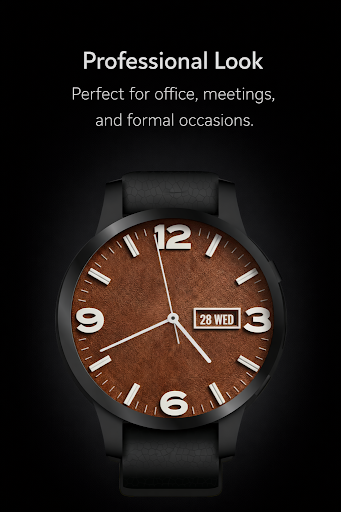
"Classic brown leather analog watch face with date & day display."




Sobre este app
Experience timeless elegance on your wrist with the Analog Brown Leather WatchFace, a premium classic-style analog watch face designed for Wear OS. Inspired by rich brown leather textures and traditional watch craftsmanship, this design delivers a refined and professional look suitable for everyday wear.
Perfect for users who appreciate classic, minimal, and elegant analog watch faces, this watch face focuses on clarity and style without unnecessary clutter.
🎯 Perfect For:
• Men and women who love classic analog watches, leather-style designs, minimal aesthetics, and professional looks.
✨ Key Features:
• Classic analog time display
• Date & Day display only
• Realistic brown leather dial texture
• Clean hour markers for easy readability
• Smooth performance optimized for Wear OS
• Always-On Display (AOD) support
⚙️ Phone Companion App
• The companion mobile app helps you easily install and find the watch face on your Wear OS smartwatch.
🕒 Watch Face Features
• Analog time display (hour & minute hands)
• Date display (1–31)
• Day display (MON–SUN)
• Classic brown leather textured dial
• Clear hour markers for easy readability
• Always-On Display (AOD) support
• Optimized for smooth performance on Wear OS
📲 Installation Instructions:
1. Open the companion app on your phone
2. Tap “Install on Watch” Select Analog Brown Leather WatchFace from your watch face gallery
✅ Compatibility:
• Compatible with all Wear OS devices (API 33+), including Google Pixel Watch and Samsung Galaxy Watch.
• ❌ Not supported on rectangular watches.
Elevate your style with the Analog Brown Leather WatchFace — where classic design meets modern Wear OS performance.
Info do App
Versão
Atualizado em
Aug 02, 2026
Tamanho
Requer Android
ID do pacote
com.analogdial.brownleather.watchface
Instalações
5.2K+
Categoria
Tools
Permissões do aplicativo
-
Location
- approximate location (network-based)
- precise location (GPS and network-based)
-
Wi-Fi connection information
- view Wi-Fi connections
-
Other
- view network connections
- pair with Bluetooth devices
- access Bluetooth settings
- connect and disconnect from Wi-Fi
- full network access
- prevent device from sleeping


