

PlayerPro Black Precision skin
Music & Audio
0.0
0 Downloads
"A striking monochrome redesign of PlayerPro inspired by precision hi-fi"
Instalar no Google Play
App pago


Sobre este app
Minimal black. Maximum character.
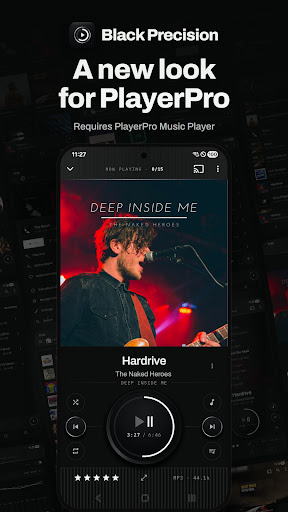
Black Precision gives PlayerPro the look of finely crafted audio equipment. Layered black metal, brushed details and cool white light replace bright colors.
Instead of colorful accents, a fine line of white light shows what is playing or selected. The result is focused, modern and deliberately minimal.
This is more than a color change. It gives the Now Playing screen, sound effects, music browsers, navigation and menus a coordinated new design.
THE LOOK
- Deep black metal with brushed finishes
- White light accents instead of bright colors
- Precise, instrument-inspired lettering and controls
WHAT IT CHANGES
- Now Playing - A redesigned Now Playing screen with framed artwork and a built-in control panel.
- Sound effects - A matching sound effects screen with a recessed equalizer and audio dials.
- Your library - Redesigned album, artist, genre, folder, playlist, song, video and radio browsers.
- Navigation and actions - Matching menus, album and artist pages, action sheets and multi-select screens.
INSTALLATION INSTRUCTIONS
Open PlayerPro and go to Settings > Look and feel > Select skin. Tap Black Precision in the Skins grid, then Apply as day - or Apply as night, to use it only after dark.
REQUIREMENTS
- PlayerPro Music Player 6.0 or later.
- Android 11 or later.
- PlayerPro Music Player or the free PlayerPro Trial must be installed.
This skin changes the appearance of PlayerPro. It is not a separate music player and cannot be opened on its own.
Black Precision gives PlayerPro the look of finely crafted audio equipment. Layered black metal, brushed details and cool white light replace bright colors.
Instead of colorful accents, a fine line of white light shows what is playing or selected. The result is focused, modern and deliberately minimal.
This is more than a color change. It gives the Now Playing screen, sound effects, music browsers, navigation and menus a coordinated new design.
THE LOOK
- Deep black metal with brushed finishes
- White light accents instead of bright colors
- Precise, instrument-inspired lettering and controls
WHAT IT CHANGES
- Now Playing - A redesigned Now Playing screen with framed artwork and a built-in control panel.
- Sound effects - A matching sound effects screen with a recessed equalizer and audio dials.
- Your library - Redesigned album, artist, genre, folder, playlist, song, video and radio browsers.
- Navigation and actions - Matching menus, album and artist pages, action sheets and multi-select screens.
INSTALLATION INSTRUCTIONS
Open PlayerPro and go to Settings > Look and feel > Select skin. Tap Black Precision in the Skins grid, then Apply as day - or Apply as night, to use it only after dark.
REQUIREMENTS
- PlayerPro Music Player 6.0 or later.
- Android 11 or later.
- PlayerPro Music Player or the free PlayerPro Trial must be installed.
This skin changes the appearance of PlayerPro. It is not a separate music player and cannot be opened on its own.
Info do App
Versão
Atualizado em
N/A
Tamanho
Requer Android
ID do pacote
com.tbig.playerpro.pposkins.blackprecision
Instalações
0
Categoria
Music & Audio
Permissões do aplicativo
-
Other
- Google Play license check


