

Practical LCD Screen ZKinWatch
Personalization
0.0
143 Downloads
"The Watch supports running on Wear OS"
Instalar no Google Play
App pago



Sobre este app
The Watch supports running on Wear OS
Hope you leave a positive review for this watch!
【Buy one get one】Please send the following content to my email: [email protected]
[Order ID: GPA.××××-××××-××××-×××××
Name of the complimentary Watch:××]
I will send you free coupons within a week.
🏠Other my works here:
https://play.google.com/store/apps/dev?id=9082617204511160070
🎁Add Telegram group to obtain remaining coupons :
https://t.me/zkinwatch
⌚️Instagram :
https://www.instagram.com/zkinwatchfaces?igsh=OHNuOHExbGliYWtm
⌚️Facebook :
https://www.facebook.com/share/1YFxgRMiqf/
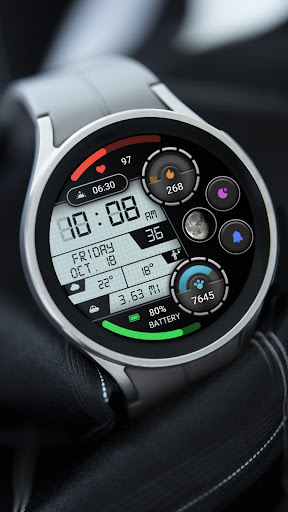
1. Top: Heart rate and percentage progress, Custom data, Calories and percentage progress
2. Central region: Time, Morning and afternoon, Week, Date, Second, Moon phase, Custom app, Custom data
3. Bottom: Distance, Steps, Step Target Percentage Progress, Battery and Percentage Progress
Customization: Multiple customization areas are available for selection
Compatible devices: Galaxy Watch 4/5/6/7/8 and other devices that support Wear OS
How do I install the watch face on WearOS ?
1. Install it from Google Play Wear Store on your watch
2. Install the companion app for fully customization (Android phone devices)
Info do App
Versão
Atualizado em
Oct 15, 2026
Tamanho
Requer Android
ID do pacote
com.watchfacestudio.PracticalLCDScreen
Instalações
143
Categoria
Personalization
O que há de novo
Update: Support for higher versions
More watch faces: https://zkinwatchfaces.com/
More watch faces: https://zkinwatchfaces.com/
Permissões do aplicativo
-
Other
- Google Play license check

Avaliações e resenhas
0.0
Total de avaliações
5
4
3
2
1
W
Wail Faqeer
May 13, 2026
looks great


