

ML2U 377 Watch Face
Personalization
0.0
403 Downloads
"Wear OS Watchface With Customizable Complication"
Instalar no Google Play
App pago




Sobre este app
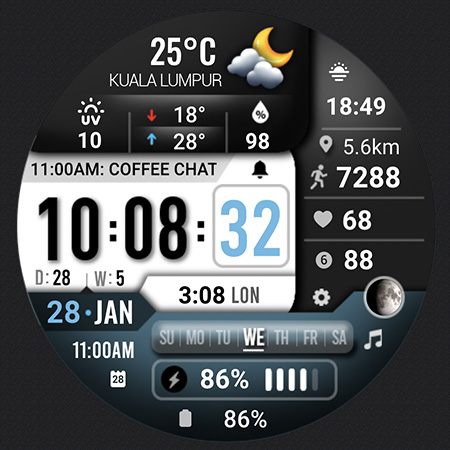
ML2U 377: Your All-in-One Digital Dashboard
Stay ahead of your day with the ML2U 377 watch face. Designed for high-performance utility, it packs professional-grade data into a premium digital interface
Everything you need, right on your wrist.
FEATURES:
- 12/24hr based on phone settings
- Day/Date/Month(Tap for Calendar)
- Steps
- Distance(Tap for Google Map)
- Battery(Tap for detail)
- Weather Info
- 8 customizable complications
- Changeable color
- Phone(Tap Hour digit)
- Message(Tap Message digit)
- Alarm
- Music
- Setting
To customise your watch face, simply touch and hold the display, then tap the Customise button.
To display your location in the weather section, set the editable complication to Weather.
If the weather information displays "NO INFO", please try one of the following methods to fix it:
Method 1: Switch to a different watch face that includes weather information, then switch back to this one.
Method 2: Ensure the editable complication is set to Weather. Tap it to open the weather app, scroll down to the bottom, and tap the refresh icon next to the "last updated" timestamp.
This watch face is compatible with all Wear OS 5 or above devices.
Watch face don’t automatically apply on your watch screen after the installation. You need to set it on your watch’s screen.
Thank you very much for your support!!
ML2U
Info do App
Versão
Atualizado em
Sep 06, 2026
Tamanho
Requer Android
ID do pacote
com.watchfacestudio.ml2u377
Instalações
403
Categoria
Personalization
O que há de novo
First release companion app
Permissões do aplicativo
-
Other
- Google Play license check

Avaliações e resenhas
0.0
Total de avaliações
5
4
3
2
1
D
Dr. A Jefri
May 16, 2026
AOD Looks weird
G
Grigorescu Ionut
May 16, 2026
Amazing design and so useful ,special that weather animation icon și magic 🪄
T
THANH HOA CAO
Feb 08, 2026
Nice wf with full informative. Should improve brighter AOD with full informations


