

Doodle 2 Digital Watch Face
Personalization
0.0
137 Загрузки
"A playful doodle watch face for Wear OS"
Установить в Google Play
Платное приложение






Об этом приложении
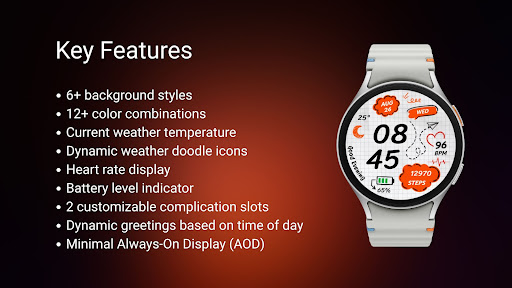
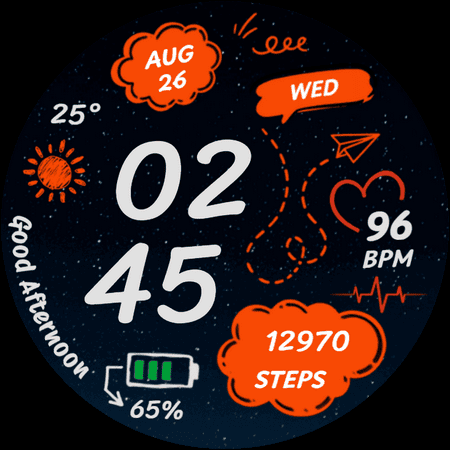
Doodle 2 Watch Face brings a hand-drawn, sketchbook-style look to your Wear OS watch. It mixes a large digital clock with playful doodles and useful everyday information, while keeping the layout easy to read at a glance.
Choose from different backgrounds and color combinations to give the watch face your own look. Weather details and doodle-style weather icons also change based on the current conditions.
✨ Key Features
- Doodle-themed digital watch face design
- 6+ background styles
- 12+ color combinations
- Current weather temperature
- Dynamic weather doodle icons
- Heart rate display
- Day, month, and date information
- Battery level indicator
- 2 customizable complication slots
- Dynamic greetings based on the time of day
- Minimal Always-On Display (AOD)
☀️ IMPORTANT: If the weather doesn't update:
1. Try switching between watch faces
2. Open the default 'Weather' app on your watch and enable location permission.
3. Ensure location access is set to "Always Allow" for both the watch face and the weather provider.
4. Check that Location (GPS) is toggled ON in both the watch and the paired smartphone settings.
5. Turn off Battery Power Saving mode to allow background data sync.
⚠️ Compatibility
This watch face is designed for smartwatches running Wear OS 5 or newer, built using the latest Watch Face Format.
Compatible devices include:
- Samsung Galaxy Watch Series (including Classic and Ultra models)
- Google Pixel Watch Series
- Other smartwatch brands running Wear OS 5 or newer
📩 Contact & Support
If you have any questions, issues, or feedback, feel free to contact me at [email protected] or visit https://gadgetliv.com/contact
Choose from different backgrounds and color combinations to give the watch face your own look. Weather details and doodle-style weather icons also change based on the current conditions.
✨ Key Features
- Doodle-themed digital watch face design
- 6+ background styles
- 12+ color combinations
- Current weather temperature
- Dynamic weather doodle icons
- Heart rate display
- Day, month, and date information
- Battery level indicator
- 2 customizable complication slots
- Dynamic greetings based on the time of day
- Minimal Always-On Display (AOD)
☀️ IMPORTANT: If the weather doesn't update:
1. Try switching between watch faces
2. Open the default 'Weather' app on your watch and enable location permission.
3. Ensure location access is set to "Always Allow" for both the watch face and the weather provider.
4. Check that Location (GPS) is toggled ON in both the watch and the paired smartphone settings.
5. Turn off Battery Power Saving mode to allow background data sync.
⚠️ Compatibility
This watch face is designed for smartwatches running Wear OS 5 or newer, built using the latest Watch Face Format.
Compatible devices include:
- Samsung Galaxy Watch Series (including Classic and Ultra models)
- Google Pixel Watch Series
- Other smartwatch brands running Wear OS 5 or newer
📩 Contact & Support
If you have any questions, issues, or feedback, feel free to contact me at [email protected] or visit https://gadgetliv.com/contact
Информация о приложении
Версия
Обновлено
N/A
Размер
Требует Android
ID пакета
com.gadgetliv.doodle2
Установок
137
Категория
Personalization
Разрешения приложений
-
Other
- full network access
- prevent device from sleeping
- Google Play license check

Рейтинги и отзывы
0.0
Всего оценок
5
4
3
2
1
H
Harrison Heiman
Sep 13, 2026
Unique watch face ⌚️...really like it.


