

Mobi PDF・Editor・Scanner・Reader
Productivity
4.5
21.7M+ Загрузки
"Read, scan, edit & sign PDFs, OCR, convert PDF to Word, annotate & merge PDFs"




Об этом приложении
MobiPDF Editor and Scanner gives you a powerful collection of expert tools to quickly and easily view, review, edit, create, and secure PDFs on your phone, wherever you are.
📃 AI-Powered Scan to PDF
Experience AI-powered scanning with enhanced edge detection and capture clear scans of your paper documents to convert them into editable PDF files. From receipts and contracts to invoices, notes, certificates, reports, IDs, and passports, MobiPDF delivers fast and reliable scanning.
👁️ Recognize text (OCR)
Utilize OCR technology to recognize text from scans and images and easily share the recognized text by email, messaging apps, or upload it to the cloud.
✏️ Edit PDF files
Access one of the most advanced mobile PDF editors on the market and edit PDFs, create blank PDFs, and insert, remove, or modify various document aspects including text, pictures, signatures, comments, drawings, certificates, and more.
✒️ Fill and Sign
Fill out and share forms and sign documents on the go with advanced support for fillable PDFs, enabling you to draw your signature directly on documents or reuse saved electronic signatures while making all the changes you need.
🖨️ Print PDFs
Print PDF documents wirelessly straight from your phone.
➕ Convert PDFs
Convert PDFs to Word, Excel, PowerPoint, or ePub formats while preserving the original layout and formatting, and save Word, Excel, PowerPoint, and ePub files as PDFs for easy sharing. Enjoy reliable conversion of PNG and JPEG images into editable PDF files or use the free PNG and JPEG converter within MobiPDF to easily turn PDF documents into images.
🔐 Protect PDFs
Protect your sensitive documents with passwords to lock, encrypt, and restrict user access and utilize digital certificates for authenticity validation.
☁️ Back-up your scans and PDFs
Log into your account to access 5GB of free cloud storage on MobiDrive. Upgrade to MobiPDF Premium for an additional 50GB of storage.
🗨️ View and Comment
Enhance your reading experience with MobiPDF's advanced PDF viewer and easily switch different page modes or enable Read More for distraction-free reading. Easily add comments, use drawing tools, highlight and markup text, insert stamps, or attach files to your PDF.
📚 Organize pages in PDFs
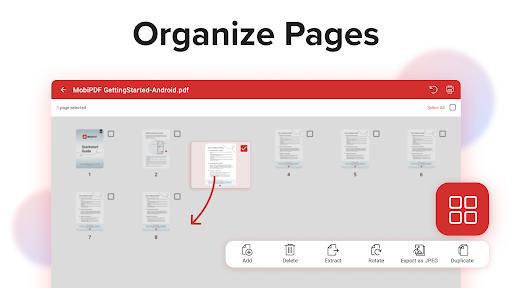
Enjoy full control over your PDF documents: view, rearrange, insert, delete, extract, duplicate, and rotate pages or merge PDFs into one to create your perfectly organized PDF layout.
Use In-App Purchases to unlock the best mobile scanner and editor experience. Please note:
• All payments are charged by Google Play Store after you confirm the purchase.
• Unless you cancel at least 24 hours before the end of the current period, your account will be automatically charged for renewal.
• You can manage your subscriptions by going to your Google Play Account Settings.
Need more? Check out our free MobiPDF version for Windows desktop - https://mobisystems.com/en-us/mobipdf
Help Center: https://support.mobisystems.com/hc/en-us/sections/20794400214045-Android
Privacy Policy: https://mobisystems.com/en-us/privacy-policy
Terms of Use: https://mobisystems.com/en-us/terms-of-use
Информация о приложении
Версия
11.18.270981
Обновлено
Nov 16, 2026
Размер
Требует Android
8.0
ID пакета
com.mobisystems.mobiscanner
Установок
21.7M+
Категория
Productivity
Что нового
Give your eyes a break and listen to your PDFs. Catch up on documents while you’re on the go or getting things done.
Разрешения приложений
-
Identity
- find accounts on the device
- add or remove accounts
-
Contacts
- find accounts on the device
-
Photos/Media/Files
- read the contents of your USB storage
- modify or delete the contents of your USB storage
-
Storage
- read the contents of your USB storage
- modify or delete the contents of your USB storage
-
Camera
- take pictures and videos
-
Wi-Fi connection information
- view Wi-Fi connections
-
Other
- Access email provider data
- receive data from Internet
- view network connections
- create accounts and set passwords
- change network connectivity
- full network access
- run at startup
- reorder running apps
- use accounts on the device
- control vibration
- prevent device from sleeping
- add words to user-defined dictionary
- Google Play license check
- read Google service configuration


Рейтинги и отзывы
4.5
Всего оценок
5
4
3
2
1
E
Eric Ridgeway
Nov 27, 2026
scam
S
Samih Sowaity
Nov 26, 2026
ok
H
HOSEIN AHMADI
Nov 26, 2026
💯💯💯💯👌👌👌👌
M
Maikan
Nov 26, 2026
Dishonest & poorly made. Hidden paywall.
j
joseph west
Nov 26, 2026
requires subscription to do literally anything useful, immediate 1 star
N
Neville Mckenzie
Nov 25, 2026
easy to use


