

UsA Exclusive - USA127
Personalization


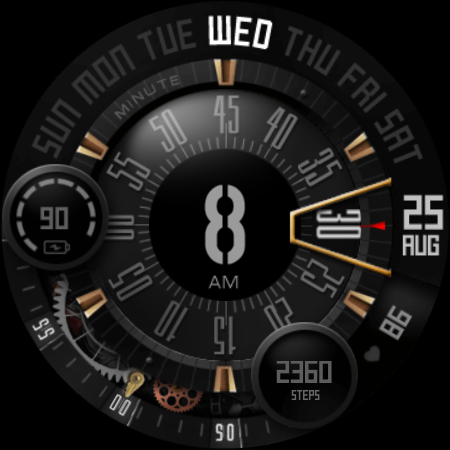


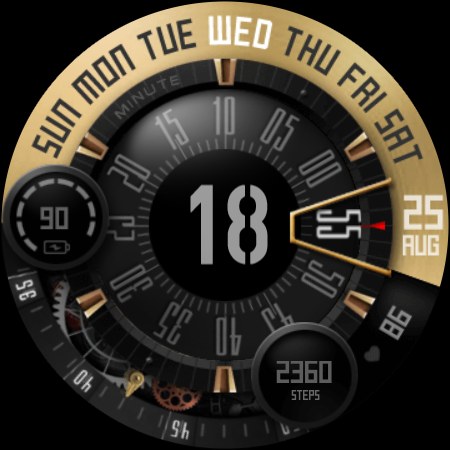

Об этом приложении
This watch face requires Wear OS API 33+ (Wear OS 4 or newer). Compatible with Galaxy Watch 4/5/6/7/8 Series and newer, Pixel Watch series and other watch face with Wear OS 4 or newer.
Features:
- Customize plate color style
- Customize the hour, battery color
- 12/24 hour mode
- Battery information gauge
- Customisable Steps information ( you change it to weather or other available info)
- 2 custom app shortcuts
- AOD dim mode
Tap and hold the watch face and go to the "customize" menu (or settings icon under the watch face) to change the styles and also manage the custom shortcut complication.
To show the heart rate, wear the watch, stay still and tap the heart rate area. It will blink and measure your heart rate. The heart rate will be shown after the successful reading. The default usually shows 0 before the reading is complete.
The heart rate synced with S-Health data and you can change the reading interval setting on the S-Health HR setting. Make sure to allow "sensor" permission to be able showing the heart rate.
To change between 12 or 24-hour mode, go to your phone date and time settings and there is an option to use 24-hour mode or 12-hour mode. The watch will sync with your new settings after a few moments.
Special designed Always On Display ambient mode. Turn on the Always On Display mode on your watch settings to show a low power display on idle. Please be aware, this feature will use more batteries.
Make sure you are purchasing using the same Google account registered on your watch. The installation should begin automatically on the watch after a few moments.
After the installation is completed on your watch, do these steps to open the watch face on your watch :
1. Open the watch face list on your watch (tap and hold the current watch face)
2. Scroll to the right and tap "add watch face"
3. Scroll down and find new installed watch face in the "downloaded" section
Check this video for more details
https://youtu.be/fhOjJtKMNws
Join our Telegram group for live support and discussion
https://t.me/usadesignwatchface
Информация о приложении
Что нового
Рейтинги и отзывы
Not the best quality of the image even even on Samsung galaxy watch ultra
Absolutely great design that I have purchased but unfortunately it is let down by a mediocre AOD mode. Do not remove colors, just DIM the colors! Dev, go see for yourself how it should be done by checking out how world-class elite designer S4U (Styles 4 You) implements user configurable AOD settings for many of his watch faces. He has many AOD fans!
Great watch face on the galaxy 4. But doesn't work on the new pixel watch 3
Wonderful.
I like the function of the face that is very unique it makes my new watch attractive to look at for the time. I would like to add to my review that if you can work out an update to flip the numbers on the seconds so they don't look upside down otherwise great watch display.
So bad experience. Minutes are not clear, as shown in the photo. Please refund my money.
Похожие приложения

Shadow Divide - animated face

Comet: Watch Face

UsA Concentro Anim - USA177

ML2U 214b Watch Face

Bricks: Watch Face

VS Farmin GenixPro
Больше от разработчика

UsA Gear X Animated - USA193

UsA Butter Three Anim - USA192

UsA Butter Two Anim - USA191

UsA Doodle 2 Animated - USA190

UsA Flip Watch Face - USA189
