

【Digital】Blue Half Tone
Personalization
0.0
472 Загрузки
"The Watch supports running on Wear OS"
Установить в Google Play
Платное приложение




Об этом приложении
The Watch supports running on Wear OS
🏠Other my works here:
https://play.google.com/store/apps/dev?id=9082617204511160070
Hope you leave a positive review for this watch!
【Buy one get one】Please send the following content to my email: [email protected]
[Order ID: GPA.××××-××××-××××-×××××
Name of the complimentary Watch:××]
I will send you free coupons within a week.
🎁Add Telegram group to obtain remaining coupons :
https://t.me/zkinwatch
⌚️Instagram :
https://www.instagram.com/zkinwatchfaces?igsh=OHNuOHExbGliYWtm
⌚️Facebook :
https://www.facebook.com/share/1YFxgRMiqf/
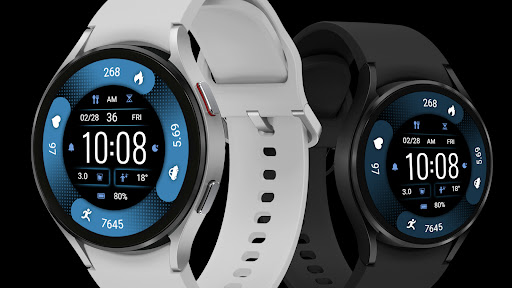
Function Introduction:
1. Outer circle: Calories, Distance, Steps, Heart rate
2. Top: Custom APP, AMPM, Date, Second, Week
3. Central: Time
4. Bottom: Custom Data, Battery
Customization: Multiple customization areas are available for selection
Compatible devices: Galaxy Watch 4/5/6/7/8 and other devices that support Wear OS
How do I install the watch face on WearOS ?
1. Install it from Google Play Wear Store on your watch
2. Install the companion app for fully customization (Android phone devices)
🏠Other my works here:
https://play.google.com/store/apps/dev?id=9082617204511160070
Hope you leave a positive review for this watch!
【Buy one get one】Please send the following content to my email: [email protected]
[Order ID: GPA.××××-××××-××××-×××××
Name of the complimentary Watch:××]
I will send you free coupons within a week.
🎁Add Telegram group to obtain remaining coupons :
https://t.me/zkinwatch
⌚️Instagram :
https://www.instagram.com/zkinwatchfaces?igsh=OHNuOHExbGliYWtm
⌚️Facebook :
https://www.facebook.com/share/1YFxgRMiqf/
Function Introduction:
1. Outer circle: Calories, Distance, Steps, Heart rate
2. Top: Custom APP, AMPM, Date, Second, Week
3. Central: Time
4. Bottom: Custom Data, Battery
Customization: Multiple customization areas are available for selection
Compatible devices: Galaxy Watch 4/5/6/7/8 and other devices that support Wear OS
How do I install the watch face on WearOS ?
1. Install it from Google Play Wear Store on your watch
2. Install the companion app for fully customization (Android phone devices)
Информация о приложении
Версия
Обновлено
Oct 14, 2026
Размер
Требует Android
ID пакета
com.watchfacestudio.BlueHalfTone
Установок
472
Категория
Personalization
Что нового
Update: Support for higher versions
More watch faces: https://zkinwatchfaces.com/
More watch faces: https://zkinwatchfaces.com/
Разрешения приложений
-
Other
- Google Play license check

Рейтинги и отзывы
0.0
Всего оценок
5
4
3
2
1
D
David S
Jan 11, 2026
Very nice watch face.


