

Fantasy Blue LCD For Wear OS
Personalization
0.0
1 Загрузки
"These watch faces run on Wear OS"
Установить в Google Play
Платное приложение




Об этом приложении
Fantasy Blue LCD For Wear OS
These watch faces run on Wear OS
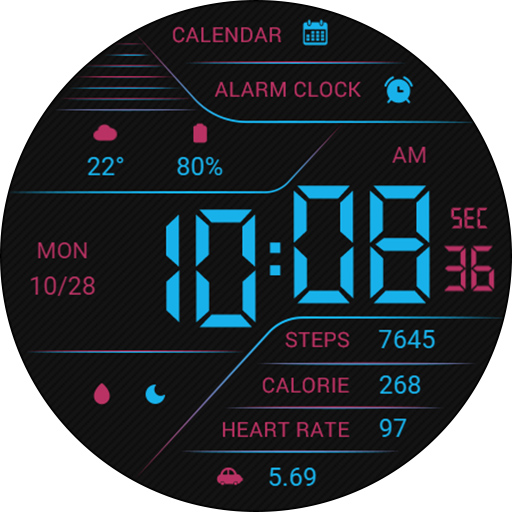
1. Top: Calendar, Alarm Clock, Custom Data;
2. Central region: week, date, time, morning and afternoon;
3. Bottom: Customize app, steps, calories, heart rate, distance.
Customization: Multiple customization areas are available for selection
Compatible devices: Pixel Watch, Galaxy Watch 4/5/6/7 and above, and other devices
How do I install the watch face on WearOS ?
1. Install it from Google Play Wear Store on your watch
2. Install the companion app for fully customization (Android phone devices)
These watch faces run on Wear OS
1. Top: Calendar, Alarm Clock, Custom Data;
2. Central region: week, date, time, morning and afternoon;
3. Bottom: Customize app, steps, calories, heart rate, distance.
Customization: Multiple customization areas are available for selection
Compatible devices: Pixel Watch, Galaxy Watch 4/5/6/7 and above, and other devices
How do I install the watch face on WearOS ?
1. Install it from Google Play Wear Store on your watch
2. Install the companion app for fully customization (Android phone devices)
Информация о приложении
Версия
Обновлено
Oct 06, 2026
Размер
Требует Android
ID пакета
com.watchfacestudio.FantasyBlueLCD
Установок
1
Категория
Personalization
Что нового
Update: Support for higher versions
More watch faces: https://zkinwatchfaces.com/
More watch faces: https://zkinwatchfaces.com/
Разрешения приложений
-
Other
- Google Play license check


