

AE ARCTURIA
Personalization
0.0
306 Загрузки
"Health activity watch face. Build with Watch Face Studio powered by Samsung."
Установить в Google Play
Платное приложение






Об этом приложении
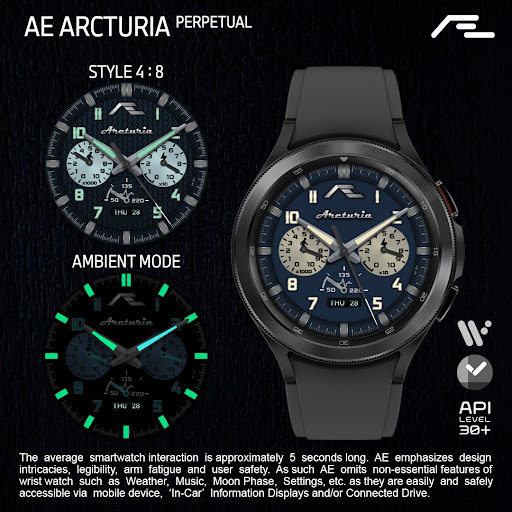
Tactical-styled sports activity watch face made for the professionals. Eight customizable luminosity and key activity information is integrated into Subdial, making it sand out as an all-occasion watch face. Complimented with AE’s signature ‘Always ON Display’ (AOD) with a striking luminosity.
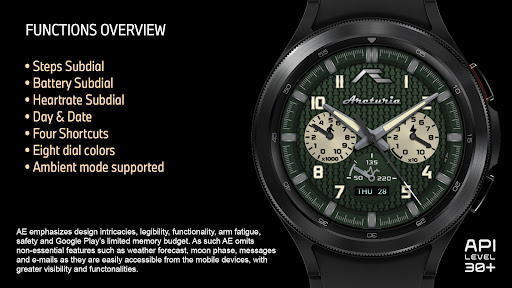
FUNCTIONS OVERVIEW
• Day and Date
• Heartrate Subdial
• Daily steps Subdial
• Battery status Subdial
• Eight dial luminosity
• Four shortcuts
• Super luminous Always ON display
PRESET SHORTCUTS
• Calendar (events)
• Alarm
• Message
• Refresh Heartrate Subdial*
• Dark mode
ABOUT THIS APP
This Wear OS app is built with Watch Face Studio powered by Samsung with an API of 30+. All functions and features of this App have been tested on Galaxy Watch 4 and worked as intended. The same may not apply to other Wear OS devices. The app is subject to change for quality and functional improvements.
During installation, allow access to sensor data on the watch. Paired with the phone app, place the watch firmly on the wrist and wait a moment for the app to initialize the Heartrate, or double tap the shortcut and give it a moment for the watch to measure. Kindly refer to the ‘Features’ screenshot to identify shortcut locations.
Информация о приложении
Версия
1.0.0
Обновлено
Oct 12, 2026
Размер
Требует Android
ID пакета
com.watchfacestudio.arcturia05
Установок
306
Категория
Personalization
Что нового
Annual compliance to update Wear OS app to target Android 15 (API level 35).


