

CELEST5459 Analog Watch
Personalization
0.0
141 Загрузки
"GMT watch face with 24-hour scale, second time zone hand & date window."
Установить в Google Play
Платное приложение




Об этом приложении
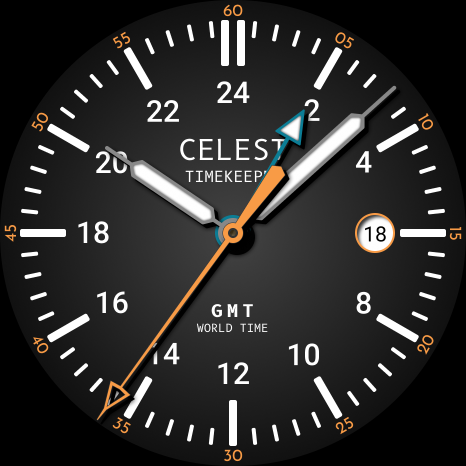
Analog GMT: CELEST5459 Analog Watch adds a fourth hand that tracks Greenwich Mean Time on a 24-hour scale, turning once a day rather than twice.
The dial is laid out for it — hours marked 2 through 24 around the face, a minute track outside them, and the GMT hand picked out in orange with an open arrow tip so you never confuse it with the hour hand. Read it against the 24-hour numerals and you have GMT at a glance, which is what you want if you work across time zones, fly, or talk to people who log times in UTC. The main hands stay conventional for local time, and the date sits in a window at three o'clock. Four color variants are included: Dark, Black, Blue, and Light.
🌍 Features
- Analog dial with a dedicated GMT hand
- 24-hour scale, with the GMT hand completing one rotation per day
- Outer minute track
- Date window at 3 o'clock
🎨 Customization
- 4 color variants: Dark, Black, Blue, Light
✅ Compatible Devices
- Google Pixel Watch/2/3/4/5
- OnePlus Watch 2/2R/3/4
- Oppo Watch X2/X3
- Samsung Galaxy Watch 4/4 Classic/5/5 Pro/6/6 Classic/7/8/8 Classic/9/FE/Ultra (2024)/(2025)/Ultra 2
- Xiaomi Watch 2/2 Pro/5
🎁 BOGO Promotion: https://celest-watches.com/bogo/
✨ Explore the complete CELEST collection in one place — including all Wear OS, HUAWEI, and Apple Watch faces, along with our apps and tools — with the CELEST Catalog app: https://play.google.com/store/apps/details?id=com.celestwatches.catalog
🔧 Installation Help
Having trouble? We've got you covered:
- Use the dropdown menu next to "Install" on your phone to select your watch model or install directly from your watch's Play Store app.
- Updating weather data (if the watch face shows weather) may take time after installation but switching to another watch face and switching back or restarting both the watch and phone usually helps.
- Check out our installation and troubleshooting guide: https://celest-watches.com/installation-troubleshooting/
- Contact us at [email protected] for quick support
📞 Support & Community
📧 Support: [email protected]
📱 Follow @celestwatches on Instagram and subscribe to our newsletter to get notified of new releases and deals: https://celest-watches.com/newsletter/
The dial is laid out for it — hours marked 2 through 24 around the face, a minute track outside them, and the GMT hand picked out in orange with an open arrow tip so you never confuse it with the hour hand. Read it against the 24-hour numerals and you have GMT at a glance, which is what you want if you work across time zones, fly, or talk to people who log times in UTC. The main hands stay conventional for local time, and the date sits in a window at three o'clock. Four color variants are included: Dark, Black, Blue, and Light.
🌍 Features
- Analog dial with a dedicated GMT hand
- 24-hour scale, with the GMT hand completing one rotation per day
- Outer minute track
- Date window at 3 o'clock
🎨 Customization
- 4 color variants: Dark, Black, Blue, Light
✅ Compatible Devices
- Google Pixel Watch/2/3/4/5
- OnePlus Watch 2/2R/3/4
- Oppo Watch X2/X3
- Samsung Galaxy Watch 4/4 Classic/5/5 Pro/6/6 Classic/7/8/8 Classic/9/FE/Ultra (2024)/(2025)/Ultra 2
- Xiaomi Watch 2/2 Pro/5
🎁 BOGO Promotion: https://celest-watches.com/bogo/
✨ Explore the complete CELEST collection in one place — including all Wear OS, HUAWEI, and Apple Watch faces, along with our apps and tools — with the CELEST Catalog app: https://play.google.com/store/apps/details?id=com.celestwatches.catalog
🔧 Installation Help
Having trouble? We've got you covered:
- Use the dropdown menu next to "Install" on your phone to select your watch model or install directly from your watch's Play Store app.
- Updating weather data (if the watch face shows weather) may take time after installation but switching to another watch face and switching back or restarting both the watch and phone usually helps.
- Check out our installation and troubleshooting guide: https://celest-watches.com/installation-troubleshooting/
- Contact us at [email protected] for quick support
📞 Support & Community
📧 Support: [email protected]
📱 Follow @celestwatches on Instagram and subscribe to our newsletter to get notified of new releases and deals: https://celest-watches.com/newsletter/
Информация о приложении
Версия
Обновлено
Aug 05, 2026
Размер
Требует Android
ID пакета
com.watchfacestudio.celest5459
Установок
141
Категория
Personalization
Что нового
Updated to target Android 16 (API 36).
Разрешения приложений
-
Other
- view network connections
- full network access

Рейтинги и отзывы
0.0
Всего оценок
5
4
3
2
1
I
IX
May 07, 2026
Another banger of a great watch face! I really appreciate the 24 hour markings. This is so minimal and very well designed! Excellent job my friend!


