

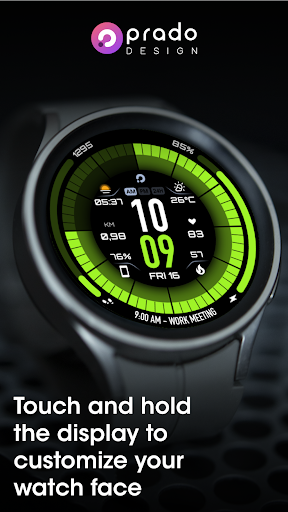
PRIME 041 Hybrid Watch Face
Personalization
4.5
11.1K+ Загрузки
"Health - Hybrid - Sporty - Battery Friendly - Futuristic - Wear OS"
Установить в Google Play
Платное приложение




Об этом приложении
Telegram Channel
https://t.me/pradodesign
Only for Wear OS devices API 30+
ATTENTION
If you see the message "Your devices are not compatible", go to the Play Store in your browser.
BUY 1 GET 1
https://pradodesignbr.com/BOGO
Features:
1. 12h/24h based on your phone settings
2. Heart Rate
3. Date
4. 8 Customizable Complications
5. Changeable background and colors
6. Watch Face Format
7. Always On Display
8. Shortcuts
Touch and hold the display to customize your watch face.
For full functionality please manually enable sensors and receive complication data permissions!
SETTING WEATHER COMPLICATION
Press and hold the center of the watch > customize > choose a major complication and choose your weather complication provider.
The weather app needs to have the weather location set before it can set a complication.
We recommend the SimpleWeather app
https://play.google.com/store/apps/details?id=com.thewizrd.simpleweather
Heart Rate
Allow access to heart rate after installing the watch face.
Tap the heart icon to start measuring heart rate.
Make sure the watch screen is turned on and that you are wearing it correctly on your wrist when measuring your heart rate.
Newsletter
Sign up to stay updated with new watch faces and promotions!
https://stats.sender.net/forms/bYgPKe/view
Website
https://pradodesignbr.com
Instagram
https://www.instagram.com/pradodesignbr
Facebook
https://www.facebook.com/pradodesignbr
Информация о приложении
Версия
Обновлено
Oct 10, 2026
Размер
Требует Android
ID пакета
com.watchfacestudio.prime041
Установок
11.1K+
Категория
Personalization
Что нового
v1.1.0
• Updated Target SDK to comply with the latest Google Play policies.
Разрешения приложений
-
Other
- Google Play license check

Рейтинги и отзывы
4.5
Всего оценок
5
4
3
2
1
O
Oleg K
Sep 17, 2026
Only half of the time displaying digits are colored, doesn't look nearly as good as it would if the color customization applied to the entire screen, better off, combined/mixed with other colors.
M
Marc Allen
Sep 12, 2026
Sporty look and polished graphics 👍
S
SuperMan Bat
Sep 12, 2026
cool
M
Mav W.D
Jul 20, 2025
Beautiful watch face
E
Eric Nail
Jul 19, 2025
Beautiful, configurable ultra-modern watch face design. Amazing work!
M
Maxime Racine
Jun 23, 2025
Doesn't work