

zwart black iconpack
Art & Design
0.0
28 Загрузки
"Black zwart Icon Pack: bold monochrome Android icons and wallpapers."


Об этом приложении
Make a striking monochrome statement on your Android home screen. Black Diamond Icon Pack pairs bold black-and-white artwork with a clean, high-contrast finish for an elegant look across your favorite apps.
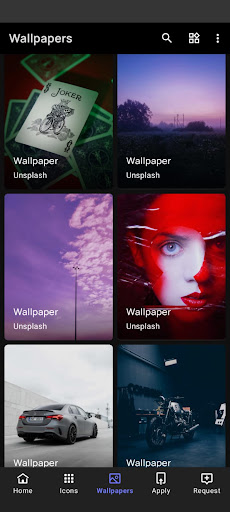
Explore 3,482 custom icons, 252 matching wallpapers, and 11 templates. Browse the icon library, find the right design, and complete your setup with a wallpaper that suits your style.
WHY Black Diamond ?
• 3,482 black-and-white custom icons
• 252 wallpapers for a coordinated home screen
• 11 templates to help personalize your setup
• Icon preview and browsing in the app
• Strong contrast and a clean monochrome aesthetic
HOW TO APPLY
1. Install an Android launcher that supports third-party icon packs.
2. Open Diamond Black Icon Pack and tap Apply, or select it in your launcher’s icon settings.
Launcher support varies by device and Android version. Some stock launchers do not support third-party icon packs; check compatibility before installing.
Choose a bold black-and-white icon theme and give your Android home screen a more refined, unified look.
An independent icon pack by Phoenix Pixel Studioz. Not affiliated with any device manufacturer or app brand.
Support: [email protected]
Developer: Phoenix Pixel Studioz
Информация о приложении
Версия
Обновлено
N/A
Размер
Требует Android
ID пакета
com.zwart.black.icon.pack
Установок
28
Категория
Art & Design
Разрешения приложений
-
Photos/Media/Files
- read the contents of your USB storage
- modify or delete the contents of your USB storage
-
Storage
- read the contents of your USB storage
- modify or delete the contents of your USB storage
-
Wi-Fi connection information
- view Wi-Fi connections
-
Other
- adjust your wallpaper size
- view network connections
- full network access
- run at startup
- set wallpaper
- control vibration
- prevent device from sleeping
- modify system settings
- Google Play license check


Больше от разработчика

Nothing Calculator
Phoenix Pixel Studioz
0.0

All in One Wholesale Rate Shop
Phoenix Pixel Studioz
0.0

Resume Builder Canvas CV Maker
Phoenix Pixel Studioz
0.0

Classified Ads Local: Free Ads
Phoenix Pixel Studioz
0.0

Nothing Icon Pack
Phoenix Pixel Studioz
0.0

Pixel Vintage Icon Pack
Phoenix Pixel Studioz
0.0