

ML2U 378 Digital Tactical HUD
Personalization
0.0
1.1K+ Nedladdningar
"Futuristic tactical HUD for Wear OS. 5 complications & customizable colors"
Installera på Google Play
Paid App


Om denna app
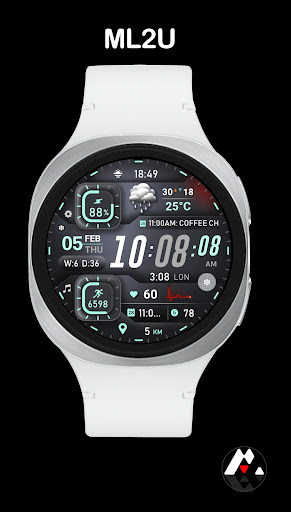
ML2U 378 | The Ultimate Digital HUD
Transform your wrist into a futuristic command center. The ML2U 378 Digital series offers a high-tech, tactical interface designed for instant readability and bold style.
Stay powered. Stay tracked. Stay stylish.
FEATURES:
⌚ Time: 12/24hr based on phone settings.
📅 Calendar: Day/Date/Month (Tap to open Calendar).
🏃 Fitness: Steps tracking & Distance (Tap for Google Maps).
❤️ Health: Heart Rate (Tap for details).
🔋 Power: Battery status (Tap for details).
🌤️ Environment: Weather Info (Tap for details).
🎨 Customization: Changeable colors.
🛠️ Utility: 2 customizable shortcuts & 5 customizable complications.
⚡ Quick Access:
Tap Hour for Alarm.
Tap Minutes for Phone.
Tap Seconds for Messages.
Quick icons for Settings and Music.
⚠️ WEATHER "NO INFO" TROUBLESHOOTING: If weather data is not appearing, please try:
Method 1: Switch to a different watch face, then switch back to ML2U 378.
Method 2: Tap "NO INFO" to open the weather app, then tap the Refresh icon next to the "last updated" timestamp.
INSTALLATION NOTES:
Compatibility: Supports all Wear OS 5 or above devices.
Watch face don’t automatically apply on your watch screen after the installation. You need to set it on your watch’s screen.
Thank you very much for your support!
ML2U
Appinfo
Version
Uppdaterad den
Sep 06, 2026
Storlek
Kräver Android
Paket-ID
com.watchfacestudio.ml2u378
Installationer
1.1K+
Kategori
Personalization
Vad är nytt
First release companion app.
Appbehörigheter
-
Other
- Google Play license check

Betyg och recensioner
0.0
Totala betyg
5
4
3
2
1
C
Craig Ippolito
Nov 19, 2026
stunning design and options in this watchface. amazing work form this developer.
S
Salem Albadin
Jul 03, 2026
you are the best
C
ClaytonD
Mar 18, 2026
Excellent watchface that is easy to read and appealing to the eye. Plenty of complications, looks and works great on my GW6c
J
Jason Hall
Feb 03, 2026
awesome watch face..works perfect..looks excellent 👌
K
Keith Ferguson
Jan 25, 2026
nice watch face thanks 👍


