

Printer: Smart Print App
Tools
4.7
755.9K+ ดาวน์โหลด
"Print & scan documents effortlessly from your phone with Smart Printer App"




เกี่ยวกับแอปนี้
Transform your mobile device into a practical printing and scanning solution with our versatile app! Printer: Smart Print App helps you print documents, images, web pages, emails, text, and ready-made printables, while also giving you useful tools to manage files, edit content, and scan documents in one place.
⭐ Key Features of Printer: Smart Print App:
★ Print Documents:
Print important files directly from your device with a simple and organized workflow. Whether you need paperwork for work, study, or daily use, the app helps you prepare and print documents with ease.
★ Print Images:
Print photos and image files from your phone whenever you need physical copies. From personal memories to useful visuals, you can quickly select and print your images in just a few taps.
★ Print Emails:
Turn important emails into paper copies for review, filing, or office use. The app makes it easier to move from inbox to print without extra steps.
★ Print Text:
Print plain text content for notes, reminders, drafts, or simple written materials. It is a convenient option when you need a clear printed version of short content.
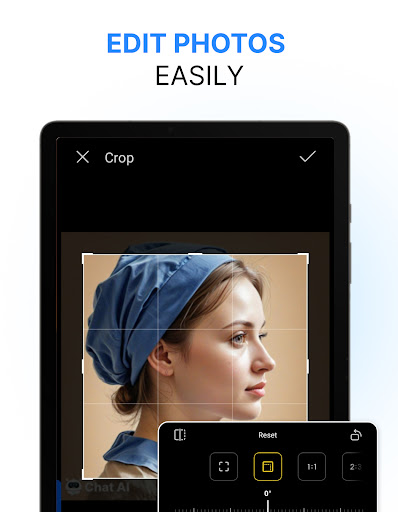
★ Built-In Editor:
Make quick adjustments before printing. The editor helps you prepare documents and images so your content is ready before final output.
★ Document Scanning:
Use the scan feature to capture documents and turn them into digital files. It is helpful for saving paperwork, creating digital copies, or preparing scans for printing.
⭐ Why Choose Printer: Smart Print App?
★ All-in-One Workflow:
Print, scan, edit, and manage files in one app, making your daily tasks more convenient and efficient.
★ Easy Navigation:
The simple interface helps you move smoothly between printing, file access, editing, and scanning features.
★ Useful for Everyday Printing:
From documents and emails to images, text, and web pages, the app supports a wide range of practical printing needs.
★ Flexible Content Preparation:
With separate sections for printing, files, editing, and scanning, you can prepare your content the way you want before printing.
★ Printing and Scanning Made Simple:
Printer App: Smart Print, Scan gives you a straightforward way to handle both printing and scanning from your phone.
Download Printer: Smart Print App now and enjoy an easier way to print documents, images, emails, web pages, text, and more directly from your mobile device.
DISCLAIMER: This app is not affiliated with HP, Canon, Epson, or any other brand named in the description.
⭐ Key Features of Printer: Smart Print App:
★ Print Documents:
Print important files directly from your device with a simple and organized workflow. Whether you need paperwork for work, study, or daily use, the app helps you prepare and print documents with ease.
★ Print Images:
Print photos and image files from your phone whenever you need physical copies. From personal memories to useful visuals, you can quickly select and print your images in just a few taps.
★ Print Emails:
Turn important emails into paper copies for review, filing, or office use. The app makes it easier to move from inbox to print without extra steps.
★ Print Text:
Print plain text content for notes, reminders, drafts, or simple written materials. It is a convenient option when you need a clear printed version of short content.
★ Built-In Editor:
Make quick adjustments before printing. The editor helps you prepare documents and images so your content is ready before final output.
★ Document Scanning:
Use the scan feature to capture documents and turn them into digital files. It is helpful for saving paperwork, creating digital copies, or preparing scans for printing.
⭐ Why Choose Printer: Smart Print App?
★ All-in-One Workflow:
Print, scan, edit, and manage files in one app, making your daily tasks more convenient and efficient.
★ Easy Navigation:
The simple interface helps you move smoothly between printing, file access, editing, and scanning features.
★ Useful for Everyday Printing:
From documents and emails to images, text, and web pages, the app supports a wide range of practical printing needs.
★ Flexible Content Preparation:
With separate sections for printing, files, editing, and scanning, you can prepare your content the way you want before printing.
★ Printing and Scanning Made Simple:
Printer App: Smart Print, Scan gives you a straightforward way to handle both printing and scanning from your phone.
Download Printer: Smart Print App now and enjoy an easier way to print documents, images, emails, web pages, text, and more directly from your mobile device.
DISCLAIMER: This app is not affiliated with HP, Canon, Epson, or any other brand named in the description.
ข้อมูลแอป
เวอร์ชัน
อัปเดตเมื่อ
N/A
ขนาด
ต้องการ Android
รหัสแพ็คเกจ
com.begamob.printer
การติดตั้ง
755.9K+
หมวดหมู่
Tools
สิทธิ์ของแอป
-
Contacts
- read your contacts
-
Photos/Media/Files
- read the contents of your USB storage
- modify or delete the contents of your USB storage
-
Storage
- read the contents of your USB storage
- modify or delete the contents of your USB storage
-
Other
- receive data from Internet
- view network connections
- full network access
- draw over other apps
- prevent device from sleeping
- Google Play license check


คะแนนและรีวิว
4.7
คะแนนทั้งหมด
5
4
3
2
1
C
Christopher King
Nov 19, 2026
Not free
L
Luke Hibdon
Nov 06, 2026
junk just like every printer made.
d
dave mohammadi
Nov 01, 2026
bloat ware you're made to download junk. your phonr has free software
A
Allan Grimason-Blackey
Oct 30, 2026
Scam : doesn't work. Went for the free trial, tried to cancel yet I was still charged ... 5 weeks in a row. One of weeks was after I had emailed them demanding they cancel and refund. AVOID!
C
Ch Lockit
Oct 27, 2026
Excellent Job ...
T
Tlou Mokgokoloshi
Oct 26, 2026
very good
แอปที่คล้ายกัน

HP
HP Inc.
4.2

Epson iPrint
Seiko Epson Corporation
4.6

HP Print Service Plugin
HP Inc.
4.1

TP-Link Deco
TP-LINK SYSTEMS INC.
4.6

Brother Mobile Connect
Brother Industries, Ltd.
4.6

Samsung Print Service Plugin
HP Inc.
3.7
เพิ่มเติมโดยนักพัฒนา

Authenticator App - 2FA
iKame Applications - Begamob Global
4.5
TV Remote Control for Smart TV
iKame Applications - Begamob Global
4.4

Word Document: DOCX, PDF, XLSX
iKame Applications - Begamob Global
4.4

Cast for Chromecast & TV Cast
iKame Applications - Begamob Global
3.9

Artera: Blood Pressure App Log
iKame Applications - Begamob Global
4.7

Blood Pressure & HR: FaceVital
iKame Applications - Begamob Global
4.5