

Compress Video - Size Reducer
Video Players & Editors
4.5
1M+ ดาวน์โหลด
"Save space with Video Compressor App: Media Converter. Get Video Resizer today!"




เกี่ยวกับแอปนี้
What is Compress Video - Size Reducer?
🎥 Make video files smaller for storage and sharing on Android. This video compressor combines adjustable compression with format conversion, trimming, cropping and playback effects, so you can prepare a clip without switching between separate tools for each step.
Choose settings that balance file size and visual quality. The amount of space you save depends on the original video and the options you select; compression does not guarantee unchanged quality.
Who is Compress Video - Size Reducer for?
Use it when large clips take up space on your phone, when you want a smaller version to share, or when you need to shorten or reframe a video before sending it.
You can prepare a square, portrait or widescreen crop, convert a supported file to MP4, or try reverse playback for a different effect. Preview the result to decide whether its size and appearance suit your purpose.
What does Compress Video - Size Reducer do?
• Compress videos individually or process multiple files at a time.
• Choose compression presets or adjust settings such as resolution, frame rate and bitrate to balance size and detail.
• Convert supported video formats, including MOV to MP4, with options for formats such as AVI and MKV.
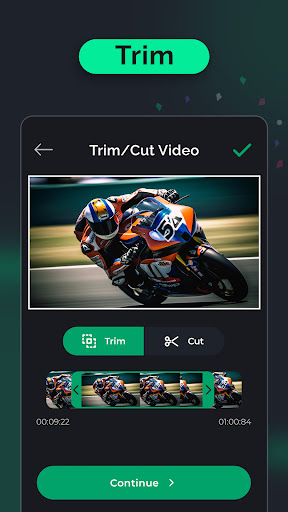
• Trim a clip's length or cut unwanted sections to keep the content you want.
• Crop with a custom frame or preset aspect ratios, including 1:1, 4:5 and 16:9.
• Change playback speed, mute a video or use reverse playback for creative edits.
• Preview and compare files before deciding which result to keep or share.
Compression and editing serve different needs: trimming changes duration, cropping changes framing, and compression settings affect the resulting file size and quality. Combine the tools to prepare the version you need.
How does Compress Video - Size Reducer work?
Select the video you want to work on and choose a tool. For a smaller file, choose a compression preset or adjust the available output settings. For an edit, trim or crop the clip, change its speed, or choose a reverse effect.
Select a supported output format when converting, then process the video. Review the result and compare its size and appearance with the original before sharing it. Keep your original until you are satisfied with the edited or compressed version.
Compatibility and requirements
The app needs access to the videos you select for processing. Available conversions depend on the source format, codec and output settings; support for a format does not mean every file using that extension will work.
Stronger compression can reduce visible detail. No fixed percentage reduction, processing time or quality level is guaranteed for every video.
The app contains ads and offers in-app purchases. Some options may require a paid purchase.
Compress Video - Size Reducer brings video compression and practical editing tools together to help you prepare smaller, suitably framed clips for storage and sharing.
ข้อมูลแอป
เวอร์ชัน
4.1.2
อัปเดตเมื่อ
Oct 30, 2026
ขนาด
ต้องการ Android
8.0
รหัสแพ็คเกจ
com.compress.video.compressor.size.reducer
การติดตั้ง
1M+
หมวดหมู่
Video Players & Editors
สิทธิ์ของแอป
-
Photos/Media/Files
- read the contents of your USB storage
- modify or delete the contents of your USB storage
-
Storage
- read the contents of your USB storage
- modify or delete the contents of your USB storage
-
Wi-Fi connection information
- view Wi-Fi connections
-
Other
- receive data from Internet
- view network connections
- full network access
- control vibration
- prevent device from sleeping
- Google Play license check


คะแนนและรีวิว
4.5
คะแนนทั้งหมด
5
4
3
2
1
t
tatkal room
Nov 27, 2026
very nice and very usefull App.
I
Ishaku Kelo
Nov 26, 2026
excellent
J
Juliana Njoku
Nov 23, 2026
very slow not quick at all
G
Grace Tacatani
Nov 23, 2026
,it's easy to use and comfortable
F
Fake People
Nov 23, 2026
great
E
EarthPotato
Nov 22, 2026
easy to use, very practical even for begginer like me. The only annoying is the ads 😅 but it's understandable and bearable.


