

GRBL Nothing (2) H Watchface
Personalization
0.0
373 ดาวน์โหลด
"Sleek & Minimal: GRBL Nothing (2) H Watchface Designed for Wear OS"
ติดตั้งบน Google Play
แอปเสียเงิน



เกี่ยวกับแอปนี้
Features:
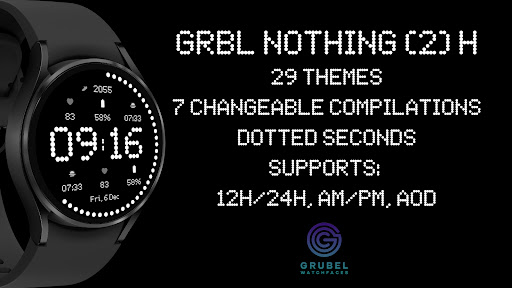
Now available in horizontal version!
Designed for Wear OS
1. Supports AM/PM and 12H/24H format
2. 7 changeable complications
3. Dotted seconds
4. Date (format change base on user's locale)
5. AOD (no compilations visible due to system limitations - sorry)
6. 29 themes
If you face any problem, please reach out to us at [email protected]. We’ll gladly provide screenshots and step-by-step instructions to help you install the watch face.
Watch faces do not change automatically after installation. To set it up, return to the home display, tap and hold, swipe to the end, and tap ‘+’ to add the watch face. Use the bezel to find it.
Samsung Developers offer a helpful video showing multiple ways to install a Wear OS watch face:
https://youtu.be/vMM4Q2-rqoM
PLEASE KEEP IN MIND THAT THE COMPANION APP DOESN'T INSTALL WATCHFACE ON THE WATCH. PLEASE READ INSTRUCTIONS BELOW.
There are two ways to install this watchaface to your WearOS device:
From PLAY STORE APP:
1. Use the drop-down menu and select the target
device on the PLAY STORE APP:
after a few minutes the watch face will transferred on
watch.
2- ACTIVATE WATCH FACE:
Once installed, you need to activate the watch face.
Long press screen, swipe left and tap "ADD WATCH
FACE" to activate it.
From PLAY STORE WEBSITE:
1 - Go to the watch face link through a Web Browser on
PC / Mac such as Chrome, Safari (etc.). You can search
the watch face name on Play Store.
Click on "Install on more devices" and select the target
device:
after a few minutes the watch face will transferred on
watch.
2- ACTIVATE WATCH FACE:
Once installed, you need to activate the watch face.
Long press screen, swipe left and tap "ADD WATCH
FACE" to activate it.
Before drop a negative feedback (1 star) on Play Store
for these reasons, please read the guide carefully or
contact me:
[email protected]
for API 34+
Remember , if you want your watch to show phone's battery status, you should install Phone Battery Complication app
Disclaimer:
Each device offers different custom complications, and selection varies by third-party apps. Custom complications shown in store screenshots come from third-party app - Phone Battery Complication
Please keep in mind that any issues on this side are
not caused by the developer/watchface. I have no
control over Google's issues.
Before drop a negative feedback (1 star) on Play Store
for these reasons, please read the guide carefully or
contact me:
[email protected]
Now available in horizontal version!
Designed for Wear OS
1. Supports AM/PM and 12H/24H format
2. 7 changeable complications
3. Dotted seconds
4. Date (format change base on user's locale)
5. AOD (no compilations visible due to system limitations - sorry)
6. 29 themes
If you face any problem, please reach out to us at [email protected]. We’ll gladly provide screenshots and step-by-step instructions to help you install the watch face.
Watch faces do not change automatically after installation. To set it up, return to the home display, tap and hold, swipe to the end, and tap ‘+’ to add the watch face. Use the bezel to find it.
Samsung Developers offer a helpful video showing multiple ways to install a Wear OS watch face:
https://youtu.be/vMM4Q2-rqoM
PLEASE KEEP IN MIND THAT THE COMPANION APP DOESN'T INSTALL WATCHFACE ON THE WATCH. PLEASE READ INSTRUCTIONS BELOW.
There are two ways to install this watchaface to your WearOS device:
From PLAY STORE APP:
1. Use the drop-down menu and select the target
device on the PLAY STORE APP:
after a few minutes the watch face will transferred on
watch.
2- ACTIVATE WATCH FACE:
Once installed, you need to activate the watch face.
Long press screen, swipe left and tap "ADD WATCH
FACE" to activate it.
From PLAY STORE WEBSITE:
1 - Go to the watch face link through a Web Browser on
PC / Mac such as Chrome, Safari (etc.). You can search
the watch face name on Play Store.
Click on "Install on more devices" and select the target
device:
after a few minutes the watch face will transferred on
watch.
2- ACTIVATE WATCH FACE:
Once installed, you need to activate the watch face.
Long press screen, swipe left and tap "ADD WATCH
FACE" to activate it.
Before drop a negative feedback (1 star) on Play Store
for these reasons, please read the guide carefully or
contact me:
[email protected]
for API 34+
Remember , if you want your watch to show phone's battery status, you should install Phone Battery Complication app
Disclaimer:
Each device offers different custom complications, and selection varies by third-party apps. Custom complications shown in store screenshots come from third-party app - Phone Battery Complication
Please keep in mind that any issues on this side are
not caused by the developer/watchface. I have no
control over Google's issues.
Before drop a negative feedback (1 star) on Play Store
for these reasons, please read the guide carefully or
contact me:
[email protected]
ข้อมูลแอป
เวอร์ชัน
อัปเดตเมื่อ
Sep 19, 2026
ขนาด
ต้องการ Android
รหัสแพ็คเกจ
com.grubel.grblnothingtwoh
การติดตั้ง
373
หมวดหมู่
Personalization
มีอะไรใหม่
- API30+ back compatible (no need to update if you already have this watchface, if you do you'll have to set your complications again)
สิทธิ์ของแอป
-
Other
- reorder running apps
- control vibration
- prevent device from sleeping

คะแนนและรีวิว
0.0
คะแนนทั้งหมด
5
4
3
2
1
M
Mark San Diego Jr.
May 14, 2026
works great, very clean and simple.
R
Richard Howell (CyberWolf2k14)
Dec 09, 2024
Not too bad. Shall give a try. BUT One BIG suggestion based on screen shots.... Please alter to change the element colors as well, not just background


