

Hex Launcher - Applock,HideApp
Personalization


เกี่ยวกับแอปนี้
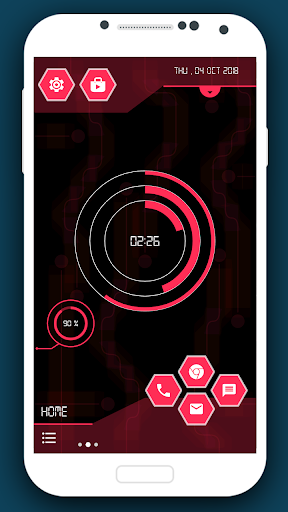
With its clean and perfect user interface design, Hex Launcher provides an easy and interactive control experience. It offers a wide array of wonderful and useful features, including a variety of color themes that allow you to personalize your phone with different styles.
App Lock:
Now you can lock your apps with a password directly from Hex Launcher, eliminating the need for a separate app for app locking.
Hide App:
Using fingerprint authentication, you can hide specific apps from the app list.
Keyboard:
Choose from 50+ different hitech keyboard designs to give your phone a unique and futuristic touch.
Incredibly faster & smarter:
Hex Launcher provides users extremely fast and smarter handling experience with simple and smooth user interface.
Elegant look:
With its colorful and beautiful themes, Hex Launcher stands out as a stylish launcher. The themes are created with love and passion, allowing you to give your phone a new, fresh, ultimate, and virtual look.
Folder:
Effortlessly manage your apps using the folder feature in Hex Launcher. Simply long-press on any icon to convert it into a folder and vice versa, organizing your apps in a better way.
Wallpaper:
Enjoy the Hi-tech wallpaper feature that adapts its color to match your chosen theme. You can also adjust the brightness of the wallpaper or apply your own images from the gallery.
Personalization:
Long-press on any app to personalize your phone further, allowing you to change apps according to your preferences.
Widgets:
Hex Launcher offers a variety of useful widgets, including a clock, weather information, calendar, map, and battery widget, providing quick access to essential information.
Gesture:
With the added swipe up and swipe down gesture feature, Hex Launcher gives you the flexibility to choose the action you want to perform with specific gestures.
Quick Search:
Access all your installed apps quickly by simply swiping down on the main screen to open the quick search feature.
Icon Pack:
Choose from two different icon packs in Hex Launcher – a simple pack and a line icon pack. You can also customize the color of the icon packs to match your preferences. You can also apply icon pack of your choice as well.
Hex Launcher is a fast and easy-to-use launcher for Android, designed with a future UI or next-generation UI style, with its extensive customization options. This app turns your Android phone into a futuristic launcher. It lets you say goodbye to outdated launchers and welcome the new and improved Inventive Launcher - AppLock, HideApp, Hitech Wallpaper, Folder, and Themes. With this app.
ข้อมูลแอป
มีอะไรใหม่
สิทธิ์ของแอป
-
Photos/Media/Files
- read the contents of your USB storage
-
Storage
- read the contents of your USB storage
-
Wi-Fi connection information
- view Wi-Fi connections
-
Other
- adjust your wallpaper size
- view network connections
- pair with Bluetooth devices
- access Bluetooth settings
- connect and disconnect from Wi-Fi
- full network access
- set wallpaper
- control vibration
- prevent device from sleeping
- modify system settings
- set an alarm
- Google Play license check


คะแนนและรีวิว
the app lags for the redmi A3X
so cool
This launcher actually works, unlike many others with glitches or poor performance. However, one major issue I have is the design and overall appearance.. the assortment of shapes, lines, and colours felt weirdly disorganised and chaotic but was actually quite simple. Two minor drawbacks: the weather widget doesn’t auto-refresh or predict location, and the app drawer is locked to A-Z sorting with no alternatives like recency of download. While small, these issues make it unsuitable for my needs.
Good and very required
Only one theme
Now I have sussed out the app, I feel very comfortable with it. I would recommend it.