

Clone Phone - Phone Switch
Tools
4.3
18.3M+ ดาวน์โหลด
"Clone Phone | Smart Switch my Phone is a convenient data transfer app, Caller ID"




เกี่ยวกับแอปนี้
Clone Phone: Phone Switch – The Ultimate Utility to Move Your Software
Looking for an easy and efficient way to move content between devices? Introducing Clone Phone: Phone Switch, your ultimate Phone Clone Data Transfer utility for seamless mobile cloning.📱
Say goodbye to complicated methods and embrace a streamlined, wireless software utility with Phone Clone: Data Transfer! Now, you can Transfer Data Easily from your old phone to your new device without a hitch.
📄 Clone Phone: Phone Switch Key Features: 📄
🔄Clone Phone: Phone Switch
📁Phone Clone: Data Transfer
🌐Move to iOS from Android
🔄Copy Phone: Move to Android
📂Copy My Data Content Transfer
⚡Smart Transfer My Data
🧙♂️Transfer Wizard
📊Storage Information Display
📞Smart Transfer My Data: Call Info Feature
Move Your Files Effortlessly With Phone Clone: Data Transfer
Move your files quickly with the Copy My Data Content Transfer. This powerful Transfer Wizard software utility makes it simple to move anything with just a few taps. Whether you're switching platforms or upgrading phones, you can now Transfer Data Easily and securely.
Seamless Mobile Cloning: 🔄
With this intuitive Clone Phone software utility, you can clone and move files effortlessly. The Copy My Data Content Transfer uses a personal hotspot, eliminating the need for the internet, Bluetooth, or any other software utility🙌. It’s perfect when you want to Transfer Data Easily on the go.
Clone Phone: Phone Switch Is Optimized for All Devices: 📱💻
This versatile Copy Phone: Move To Android app is optimized for both Android and iOS devices. Whether you're switching from Android to Android or making an Effortless Move to iOS, your files are just a few taps away with the Smart Transfer My Data.
Effortless Move to iOS from Android: 📲
Transfer From Android to iOS effortlessly with Copy My Data Content Transfer. The Effortless Move to iOS feature ensures a smooth and stable transition. Use this Phone Switch app to Transfer Data Easily between platforms. Say goodbye to messy cables and confusing setups with an Effortless Move to iOS solution you can trust.
Smart Transfer My Data: 📂
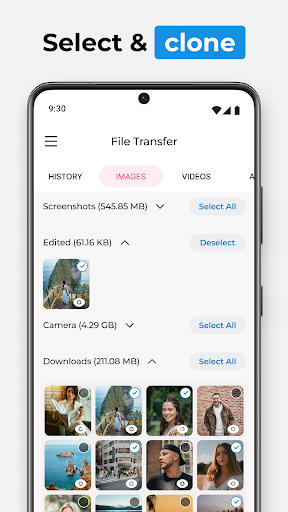
Enjoy lightning-fast relocation speeds with this Switch Phone Transfer Wizard. Our Transfer From Android To iPhone app supports various file formats. With the Switch Phone Transfer Wizard, you can navigate through your device's storage and select the files you wish to transfer.
Streamline Your File Relocation Process with Switch Phone Clone: Data Transfer!
Experience the full potential of Phone Switch with our seamless mobile cloning, secure relocation of files, and versatile device compatibility. Whether you're performing an Effortless Move to iOS or just want to Transfer Data Easily to a new Android device, we've got you covered. Welcome to the future of file relocation with Switch Phone Clone: Data Transfer! 📱🔄📁 All product names, logos, brands, trademarks, and registered trademarks that are not owned by us are the property of their respective owners. All company, product, and service names used in this app are for identification purposes only. Use of these names, trademarks, and brands does not imply endorsement. The Clone app is owned by us. We are not affiliated, associated, authorized, endorsed by, or in any way officially connected with any 3rd party apps or companies.
Looking for an easy and efficient way to move content between devices? Introducing Clone Phone: Phone Switch, your ultimate Phone Clone Data Transfer utility for seamless mobile cloning.📱
Say goodbye to complicated methods and embrace a streamlined, wireless software utility with Phone Clone: Data Transfer! Now, you can Transfer Data Easily from your old phone to your new device without a hitch.
📄 Clone Phone: Phone Switch Key Features: 📄
🔄Clone Phone: Phone Switch
📁Phone Clone: Data Transfer
🌐Move to iOS from Android
🔄Copy Phone: Move to Android
📂Copy My Data Content Transfer
⚡Smart Transfer My Data
🧙♂️Transfer Wizard
📊Storage Information Display
📞Smart Transfer My Data: Call Info Feature
Move Your Files Effortlessly With Phone Clone: Data Transfer
Move your files quickly with the Copy My Data Content Transfer. This powerful Transfer Wizard software utility makes it simple to move anything with just a few taps. Whether you're switching platforms or upgrading phones, you can now Transfer Data Easily and securely.
Seamless Mobile Cloning: 🔄
With this intuitive Clone Phone software utility, you can clone and move files effortlessly. The Copy My Data Content Transfer uses a personal hotspot, eliminating the need for the internet, Bluetooth, or any other software utility🙌. It’s perfect when you want to Transfer Data Easily on the go.
Clone Phone: Phone Switch Is Optimized for All Devices: 📱💻
This versatile Copy Phone: Move To Android app is optimized for both Android and iOS devices. Whether you're switching from Android to Android or making an Effortless Move to iOS, your files are just a few taps away with the Smart Transfer My Data.
Effortless Move to iOS from Android: 📲
Transfer From Android to iOS effortlessly with Copy My Data Content Transfer. The Effortless Move to iOS feature ensures a smooth and stable transition. Use this Phone Switch app to Transfer Data Easily between platforms. Say goodbye to messy cables and confusing setups with an Effortless Move to iOS solution you can trust.
Smart Transfer My Data: 📂
Enjoy lightning-fast relocation speeds with this Switch Phone Transfer Wizard. Our Transfer From Android To iPhone app supports various file formats. With the Switch Phone Transfer Wizard, you can navigate through your device's storage and select the files you wish to transfer.
Streamline Your File Relocation Process with Switch Phone Clone: Data Transfer!
Experience the full potential of Phone Switch with our seamless mobile cloning, secure relocation of files, and versatile device compatibility. Whether you're performing an Effortless Move to iOS or just want to Transfer Data Easily to a new Android device, we've got you covered. Welcome to the future of file relocation with Switch Phone Clone: Data Transfer! 📱🔄📁 All product names, logos, brands, trademarks, and registered trademarks that are not owned by us are the property of their respective owners. All company, product, and service names used in this app are for identification purposes only. Use of these names, trademarks, and brands does not imply endorsement. The Clone app is owned by us. We are not affiliated, associated, authorized, endorsed by, or in any way officially connected with any 3rd party apps or companies.
ข้อมูลแอป
เวอร์ชัน
11.0.2
อัปเดตเมื่อ
Oct 21, 2026
ขนาด
ต้องการ Android
5.0
รหัสแพ็คเกจ
com.m24apps.phoneswitch
การติดตั้ง
18.3M+
หมวดหมู่
Tools
มีอะไรใหม่
- General maintenance and stability fixes
- Addressed minor bugs across multiple screens
- Addressed minor bugs across multiple screens
สิทธิ์ของแอป
-
Calendar
- read calendar events plus confidential information
- add or modify calendar events and send email to guests without owners' knowledge
-
Contacts
- read your contacts
- modify your contacts
-
Location
- approximate location (network-based)
- precise location (GPS and network-based)
-
SMS
- read your text messages (SMS or MMS)
- edit your text messages (SMS or MMS)
-
Phone
- read call log
- write call log
-
Photos/Media/Files
- read the contents of your USB storage
- modify or delete the contents of your USB storage
-
Storage
- read the contents of your USB storage
- modify or delete the contents of your USB storage
-
Camera
- take pictures and videos
-
Wi-Fi connection information
- view Wi-Fi connections
-
Other
- receive data from Internet
- view network connections
- change network connectivity
- connect and disconnect from Wi-Fi
- full network access
- control vibration
- prevent device from sleeping
- modify system settings
- Google Play license check


คะแนนและรีวิว
4.3
คะแนนทั้งหมด
5
4
3
2
1
S
Selling Account
Nov 04, 2026
it always fail I waited for hour after transfer it say fail
b
blebleble 409
Nov 03, 2026
fake
H
Humayun Qureshi
Nov 01, 2026
Good
M
Mehak Jutti
Nov 01, 2026
Users are saying the sleek interface and fast pairing make data transfer smooth, while free trials and selective file control are appreciated. However, some note disconnections during transfers, intrusive ad overlays, tricky gallery organization for transferred media, and concerns over auto-renewal subscription pricing.👍👍👍
Z
Zubiks
Oct 31, 2026
nice app
S
Sana Ullah
Oct 31, 2026
bad app


