

Windows App
Business
4.2
12M+ ดาวน์โหลด
"Windows App allows you to connect to remote PCs and virtual apps."




เกี่ยวกับแอปนี้
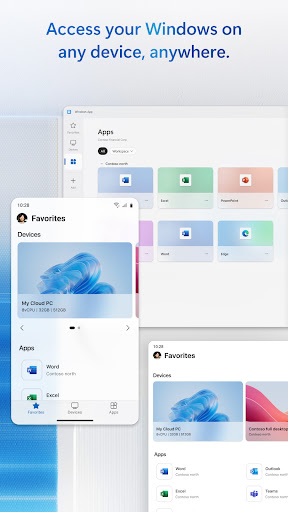
Windows App securely connects you to all remote Windows experiences, including Azure Virtual Desktop, Windows 365, Microsoft Dev Box, Remote Desktop Services, and remote PCs.
You can use Windows App on all supported Android devices running Android 11 and above: including tablets, smartphones, VR headsets and Chromebooks that support apps from the Play Store. Learn more about features and upcoming releases at aka.ms/WindowsApp
You can use Windows App on all supported Android devices running Android 11 and above: including tablets, smartphones, VR headsets and Chromebooks that support apps from the Play Store. Learn more about features and upcoming releases at aka.ms/WindowsApp
ข้อมูลแอป
เวอร์ชัน
11.0.26071.13915
อัปเดตเมื่อ
Sep 20, 2026
ขนาด
ต้องการ Android
10
รหัสแพ็คเกจ
com.microsoft.rdc.androidx
การติดตั้ง
12M+
หมวดหมู่
Business
สิทธิ์ของแอป
-
Location
- approximate location (network-based)
- precise location (GPS and network-based)
-
Photos/Media/Files
- read the contents of your USB storage
- modify or delete the contents of your USB storage
-
Storage
- read the contents of your USB storage
- modify or delete the contents of your USB storage
-
Camera
- take pictures and videos
-
Microphone
- record audio
-
Wi-Fi connection information
- view Wi-Fi connections
-
Other
- Access download manager.
- receive data from Internet
- view network connections
- pair with Bluetooth devices
- full network access
- change your audio settings
- control Near Field Communication
- run at startup
- prevent device from sleeping


คะแนนและรีวิว
4.2
คะแนนทั้งหมด
5
4
3
2
1
A
AbdulAziz MohdYusop
Sep 25, 2026
👍
F
Faisal Waheed
Sep 25, 2026
no need of a computer
J
Jonny L
Sep 25, 2026
Awful rename, the most confusing decision ever made in the history of app renames.
�
พระยุทธิ์อุทัยธนาหัส อินทร์นนท์สุริยราษฎร์อาทิตย์ (ชื่อเรียก: พระยุทธ อุทัยธนาหัตถ์)
Sep 25, 2026
พระยุทธิ์ อุทัย ธนาหัสอินทร์นนท์สุริยะ ราษฎร์ อาทิตย์
r
reginald l addison
Sep 25, 2026
Window App
S
SUHAIL
Sep 24, 2026
both devices connected in same net work its work8ng. so what is the purpose of this app if iam in same network area i can use it with my monitor


