
Galaxy Time Pro: Watch face
Personalization
0.0
43 ดาวน์โหลด
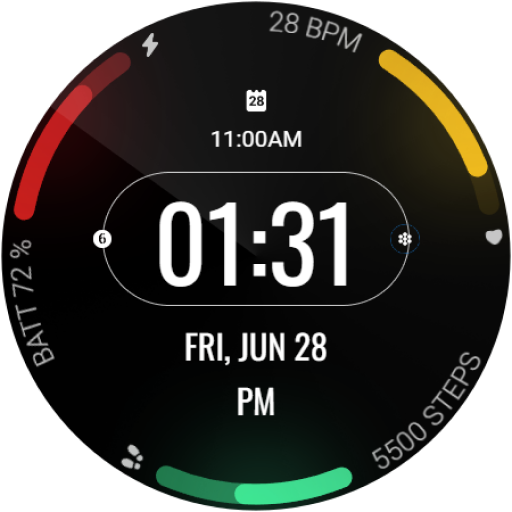
"Minimalist watch face with time, date, heart rate, battery, steps and more."


เกี่ยวกับแอปนี้
This app is for Wear OS devices.
Transform your smartwatch into a digital dashboard with Galaxy Time Pro, a sleek and informative watch face for Wear OS.
Galaxy Time Pro is a minimalist watch face designed to maximize efficiency. It features a clean, easy-to-read digital display that keeps you informed at a glance with:
• Time (hours, minutes, seconds)
• Date (day of the week, month, day)
• Heartrate
• Battery level indicator
• Step counter
• Customizable complications
Key Features:
• Supports the Always On Display (AOD) feature on AMOLED displays.
• Gradient-filled progress bars for indicators (steps, battery, and BPM).
• Highly customizable, with 10+ color options to match your style.
• Compatible with a wide range of Wear OS smartwatches.
Upgrade your smartwatch today! Download Galaxy Time Pro and experience a world of style and functionality on your wrist.
Installation Instructions:
1. Download and install the app on your Wear OS device.
2. Open the Wear OS app on your connected smartphone.
3. Select "Watch Faces" and choose Galaxy Time Pro.
4. Long-press on your watch face to access customization options.
Additional Notes:
• This app may also require its companion app to be installed on your smartphone for full functionality (if applicable).
• If you encounter any issues or require assistance, please don’t hesitate to reach out to our dedicated support address: [email protected]
Transform your smartwatch into a digital dashboard with Galaxy Time Pro, a sleek and informative watch face for Wear OS.
Galaxy Time Pro is a minimalist watch face designed to maximize efficiency. It features a clean, easy-to-read digital display that keeps you informed at a glance with:
• Time (hours, minutes, seconds)
• Date (day of the week, month, day)
• Heartrate
• Battery level indicator
• Step counter
• Customizable complications
Key Features:
• Supports the Always On Display (AOD) feature on AMOLED displays.
• Gradient-filled progress bars for indicators (steps, battery, and BPM).
• Highly customizable, with 10+ color options to match your style.
• Compatible with a wide range of Wear OS smartwatches.
Upgrade your smartwatch today! Download Galaxy Time Pro and experience a world of style and functionality on your wrist.
Installation Instructions:
1. Download and install the app on your Wear OS device.
2. Open the Wear OS app on your connected smartphone.
3. Select "Watch Faces" and choose Galaxy Time Pro.
4. Long-press on your watch face to access customization options.
Additional Notes:
• This app may also require its companion app to be installed on your smartphone for full functionality (if applicable).
• If you encounter any issues or require assistance, please don’t hesitate to reach out to our dedicated support address: [email protected]
ข้อมูลแอป
เวอร์ชัน
1.0.2
อัปเดตเมื่อ
Aug 11, 2024
ขนาด
ต้องการ Android
11
รหัสแพ็คเกจ
com.mubaraktech.galaxytimepro
การติดตั้ง
43
หมวดหมู่
Personalization
มีอะไรใหม่
Target version updated
สิทธิ์ของแอป
-
Wearable sensors/Activity data
- body sensors (like heart rate monitors)
-
Other
- reorder running apps
- control vibration
- prevent device from sleeping


แอปที่คล้ายกัน

Digital Sport V7
GW Watchfaces
0.0

Fitness Pal Watch Face
GenZync by GPhoenix
0.0

Vital Trio Watch Face
Time Design LLC
0.0

Digital Watchface D6
VG Faces
0.0

PW23 Pixel Precision Watch
PW Watchfaces by PAPY WATCH DESIGN
0.0

Active Pro Watch face
Malith Wimalarathna
0.0


