

WatchCheck: Wear OS Tester
Tools
0.0
40 ดาวน์โหลด
"Test your Wear OS display, input, haptics, sensors, and device info."




เกี่ยวกับแอปนี้
WatchCheck is a free Wear OS tester that runs on your watch. Open it on your watch and quickly check whether your watch is behaving as expected. No phone, no account, no sign-up.
Quick Check
A guided check walks through the main areas one step at a time. Mark each step Pass, Issue found or Skip, then copy or share the summary. The Quick Check Tile shows a snapshot of battery level, available RAM, thermal status and connection, with shortcuts to Quick Check and Device Info. The Quick Check complication opens Quick Check from your watch face.
What you can test:
• Display Check: screen shape, size, density, font scale and edge safety, with sample text and tap targets so you can see how layouts behave.
• Touch Check: a large tap target with a live tap count and last-tap position.
• Rotary Check: confirm your crown or bezel sends rotary input, with a live counter.
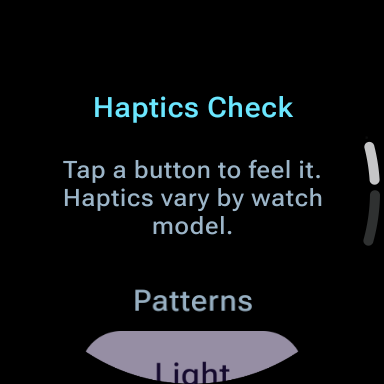
• Haptics Check: feel light, medium and strong vibration patterns on demand.
• Sensors Check: see which sensors your watch reports (accelerometer, gyroscope, heart rate, barometer, ambient light, compass, step counter). Availability only, no readings.
• Permissions: see the permissions WatchCheck uses and the ones it does not request.
• Device Info: manufacturer, model, Android version, screen, battery, app version and more system details, with Copy report, Share text report and Share JSON file for bug reports.
Built for Wear OS:
• Works on round and square watches.
• Shows your current font scale, with sample text for large font sizes.
• Dark design on a black background.
Privacy-first by design:
WatchCheck runs entirely on your watch. It has no ads, no analytics and no account. It does not request internet access; it only reads connection status. Device details are shown locally and only leave the app if you copy or share a report yourself.
WatchCheck reports what your watch says about itself. It does not diagnose health, battery health or hardware faults, and it is not a benchmark, cleaner or optimizer.
Quick Check
A guided check walks through the main areas one step at a time. Mark each step Pass, Issue found or Skip, then copy or share the summary. The Quick Check Tile shows a snapshot of battery level, available RAM, thermal status and connection, with shortcuts to Quick Check and Device Info. The Quick Check complication opens Quick Check from your watch face.
What you can test:
• Display Check: screen shape, size, density, font scale and edge safety, with sample text and tap targets so you can see how layouts behave.
• Touch Check: a large tap target with a live tap count and last-tap position.
• Rotary Check: confirm your crown or bezel sends rotary input, with a live counter.
• Haptics Check: feel light, medium and strong vibration patterns on demand.
• Sensors Check: see which sensors your watch reports (accelerometer, gyroscope, heart rate, barometer, ambient light, compass, step counter). Availability only, no readings.
• Permissions: see the permissions WatchCheck uses and the ones it does not request.
• Device Info: manufacturer, model, Android version, screen, battery, app version and more system details, with Copy report, Share text report and Share JSON file for bug reports.
Built for Wear OS:
• Works on round and square watches.
• Shows your current font scale, with sample text for large font sizes.
• Dark design on a black background.
Privacy-first by design:
WatchCheck runs entirely on your watch. It has no ads, no analytics and no account. It does not request internet access; it only reads connection status. Device details are shown locally and only leave the app if you copy or share a report yourself.
WatchCheck reports what your watch says about itself. It does not diagnose health, battery health or hardware faults, and it is not a benchmark, cleaner or optimizer.
ข้อมูลแอป
เวอร์ชัน
อัปเดตเมื่อ
N/A
ขนาด
ต้องการ Android
รหัสแพ็คเกจ
com.quazmoz.watchcheck
การติดตั้ง
40
หมวดหมู่
Tools
สิทธิ์ของแอป
-
Other
- view network connections
- control vibration
- Google Play license check


