

Autumn Frame & Halloween
Personalization
4.5
64.5K+ ดาวน์โหลด
"Customizable Wear Os Watch Face for Autumn. Multiple background & Colors"




เกี่ยวกับแอปนี้
Autumn Elegance: A Watch Face of Falling Leaves and Warm Colors - Happy Halloween!
Powered by Watch Face Format
⚙️ Phone App Features
The phone app is simply a tool to facilitate installation and locating the watch face on your Wear OS watch. Only the mobile app contains ads.
⚙️ Watch Face Features
• 12/24h Digital Time
• Date
• Battery
• Steps Count
• 1 customizable Complication
• 1 customizable Shortcut
• 7 Color Variations
• Always ON Display supported with changeable colors and changeable modes
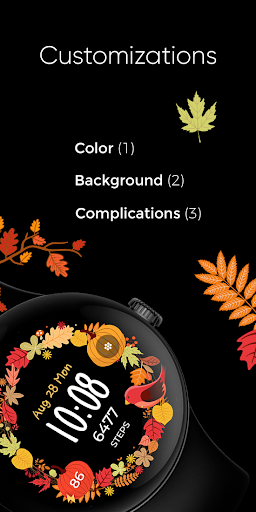
🎨 Customization
1 - Touch and hold display
2 - Tap on Customize option
🎨 Complications
Touch and hold display to open customization mode. You can customize the field with any data you want.
🔋 Battery
For better battery performance of the watch, we recommend disabling the "Always On Display" mode.
✅ Compatible devices include API level 33+ Google Pixel, Galaxy Watch 4, 5, 6, and other Wear OS models.
Installation and troubleshooting
Follow this link: https://www.recreative-watch.com/help/#installation-methodes
Watch faces don't automatically apply on your watch screen after the installation. That's why you must set it on your watch's screen.
💌 Write to [email protected] for assistance.
Powered by Watch Face Format
⚙️ Phone App Features
The phone app is simply a tool to facilitate installation and locating the watch face on your Wear OS watch. Only the mobile app contains ads.
⚙️ Watch Face Features
• 12/24h Digital Time
• Date
• Battery
• Steps Count
• 1 customizable Complication
• 1 customizable Shortcut
• 7 Color Variations
• Always ON Display supported with changeable colors and changeable modes
🎨 Customization
1 - Touch and hold display
2 - Tap on Customize option
🎨 Complications
Touch and hold display to open customization mode. You can customize the field with any data you want.
🔋 Battery
For better battery performance of the watch, we recommend disabling the "Always On Display" mode.
✅ Compatible devices include API level 33+ Google Pixel, Galaxy Watch 4, 5, 6, and other Wear OS models.
Installation and troubleshooting
Follow this link: https://www.recreative-watch.com/help/#installation-methodes
Watch faces don't automatically apply on your watch screen after the installation. That's why you must set it on your watch's screen.
💌 Write to [email protected] for assistance.
ข้อมูลแอป
เวอร์ชัน
อัปเดตเมื่อ
Oct 13, 2026
ขนาด
ต้องการ Android
รหัสแพ็คเกจ
com.recreative.pumpkinframe
การติดตั้ง
64.5K+
หมวดหมู่
Personalization
สิทธิ์ของแอป
-
Other
- receive data from Internet
- view network connections
- full network access
- prevent device from sleeping

คะแนนและรีวิว
4.5
คะแนนทั้งหมด
5
4
3
2
1
A
Andi Boone
Nov 08, 2026
don't understand how to get different designs shown for this face but love the variety of the seasonal stuff!
L
Lost Onde
Nov 03, 2026
won't find my pixel 9 watch
S
Sharon D
Nov 03, 2026
face that I select says it's not compatible with version of my watch. very frustrating
K
Kialey Wise
Oct 22, 2026
Good
A
Andrea Humble
Oct 19, 2026
Time doesn't stay updated when AOD is in use
M
Murag Iro
Oct 14, 2026
Cool


