

Samsung Magician
Tools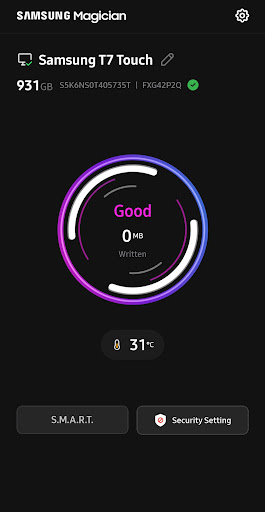


เกี่ยวกับแอปนี้
[Supported Models]
- Samsung Portable SSD T7
- Samsung Portable SSD T7 Touch
- Samsung Portable SSD T7 Shield
- Samsung Portable SSD T9
- Samsung Portable SSD T5 EVO
[Supported Features]
- Enable / disable Samsung Portable SSD security functionality.
- Change and manage Samsung Portable SSD password settings.
- Change and manage Samsung Portable SSD fingerprint settings. (T7 Touch only)
- Change Samsung Portable SSD device name.
- Provides timely notifications of the latest software and
firmware updates.
ข้อมูลแอป
มีอะไรใหม่
สิทธิ์ของแอป
-
Photos/Media/Files
- read the contents of your USB storage
- modify or delete the contents of your USB storage
-
Storage
- read the contents of your USB storage
- modify or delete the contents of your USB storage
-
Other
- download files without notification
- view network connections
- full network access
- run at startup
- reorder running apps
- draw over other apps
- control vibration
- prevent device from sleeping


คะแนนและรีวิว
no firmware updating from Android. complete waste of time for this junky, unstable bloatware app. it's just really a advertising app for Samsung.
if you got a new features on this app please update the app and give it new features then I give it five stars ⭐⭐⭐⭐⭐ For right now one star bye-bye and peace out 👋🏾👋🏾👋🏾👋🏾👋🏾👋🏾👋🏾👋🏾👋🏾👋🏾
App is working as expected
SSD Laga Dene Se bhi ismein no SSD portable show karta hai very bad apps
very buggy
Very Disappointing Experience with Samsung Magician I am facing a serious issue with my Samsung T7 Shield 1TB Portable SSD. The firmware update failed before it even started. After I locked the SSD again, Samsung Magician stopped detecting it and displayed “No Samsung Portable SSD is connected.” The password option is also missing. My SSD still appears in Windows Disk Management with approximately 931GB capacity, but the LED is not turning on. I am worried about losing my important data
แอปที่คล้ายกัน

Device Care

Phone by Google

Samsung My Files

Right Gallery

ASTRO File Manager & Cleaner

One Hand Operation +
เพิ่มเติมโดยนักพัฒนา

Samsung Smart Switch Mobile

Good Lock

SmartThings

Samsung Music

Samsung Calculator
