

UsA Sequence 3 Anim - USA180
Personalization
4.3
1.3K+ ดาวน์โหลด
"`New three way realistic scrolling watch for Wear OS"
ติดตั้งบน Google Play
แอปเสียเงิน


เกี่ยวกับแอปนี้
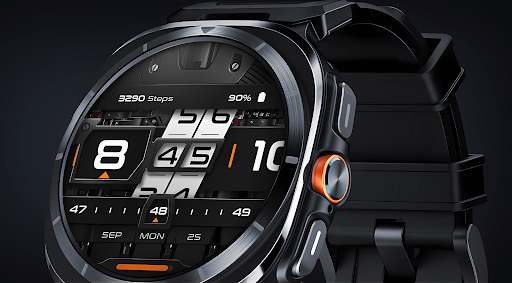
three way scrolling movement (hour, minutes, seconds). Distinctive realistic watch face with mechanical scrolling movement watch. The minutes scrolls diagonally individually. Choose your color combination and information shown on the watch.
This watch face requires Wear OS API 34+ (Wear OS 5 or newer). Compatible with Galaxy Watch 4/5/6/7 Series and newer, Pixel Watch series and other watch face with Wear OS 5 or newer.
Features:
- 12/24 hour digital with three way scrolling animation
- Customize the color style and seconds plate
- Custom complications
- Special Designed AOD
Make sure you are purchasing using the same Google account registered on your watch. The installation should begin automatically on the watch after a few moments.
After the installation is completed on your watch, do these steps to open the watch face on your watch :
1. Open the watch face list on your watch (tap and hold the current watch face)
2. Scroll to the right and tap "add watch face"
3. Scroll down and find new installed watch face in the "downloaded" section
Tap and hold the watch face and go to the "customize" menu (or settings icon under the watch face) to change the styles and also manage the custom shortcut complication.
To change between 12 or 24-hour mode, go to your phone date and time settings and there is an option to use 24-hour mode or 12-hour mode. The watch will sync with your new settings after a few moments.
Special designed Always On Display ambient mode. Turn on the Always On Display mode on your watch settings to show a low power display on idle. Please be aware, this feature will use more batteries.
Join our Telegram group for live support and discussion
https://t.me/usadesignwatchface
ข้อมูลแอป
เวอร์ชัน
อัปเดตเมื่อ
Oct 31, 2026
ขนาด
ต้องการ Android
รหัสแพ็คเกจ
com.usadesign.usasequence3
การติดตั้ง
1.3K+
หมวดหมู่
Personalization
คะแนนและรีวิว
4.3
คะแนนทั้งหมด
5
4
3
2
1
S
Steven Proffitt
Aug 05, 2025
dosent fit galaxy ultra, cut-off on the right side...
J
Jasur.N Limited
Aug 01, 2025
very cool watch face! 🔥
D
Dr. A Jefri
Jul 25, 2025
Great face, still my favorite from UsA's designs
s
srubin sajeevan
Jul 11, 2025
date is not fully visible
M
Michael C
Jun 27, 2025
This has become my go to watch face. So cool
M
Mark M
Jun 23, 2025
Exceptional customer service! Not to mention, the watch face looks awesome in my Galaxy Watch Ultra. Complications are very assessable on the watch face.


