

Practical Components Wear OS
Personalization
0.0
1 ดาวน์โหลด
"The dial supports running on Wear OS"
ติดตั้งบน Google Play
แอปเสียเงิน




เกี่ยวกับแอปนี้
Practical Components Wear OS
The dial supports running on Wear OS
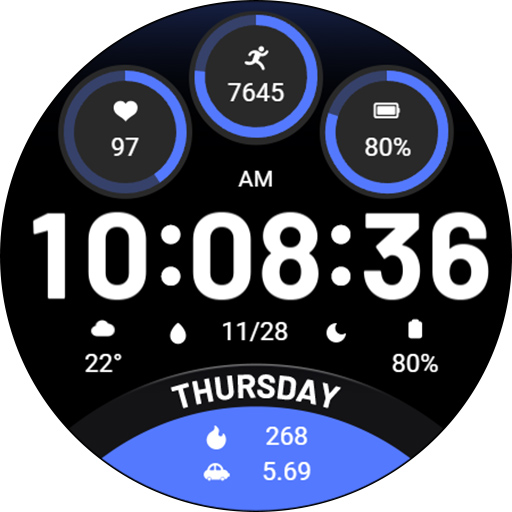
1. Top: heart rate, heart rate percentage progress, steps, step target percentage progress, battery level and percentage progress;
2. Central region: morning and afternoon, time, custom data, custom app, date, custom app, custom data;
3. Bottom: week, calories. distance.
Compatible devices: Pixel Watch, Galaxy Watch 4/5/6/7 and above, and other devices
How do I install the watch face on WearOS ?
1. Install it from Google Play Wear Store on your watch
2. Install the companion app for fully customization (Android phone devices)
The dial supports running on Wear OS
1. Top: heart rate, heart rate percentage progress, steps, step target percentage progress, battery level and percentage progress;
2. Central region: morning and afternoon, time, custom data, custom app, date, custom app, custom data;
3. Bottom: week, calories. distance.
Compatible devices: Pixel Watch, Galaxy Watch 4/5/6/7 and above, and other devices
How do I install the watch face on WearOS ?
1. Install it from Google Play Wear Store on your watch
2. Install the companion app for fully customization (Android phone devices)
ข้อมูลแอป
เวอร์ชัน
อัปเดตเมื่อ
Oct 06, 2026
ขนาด
ต้องการ Android
รหัสแพ็คเกจ
com.watchfacestudio.PracticalComponents
การติดตั้ง
1
หมวดหมู่
Personalization
มีอะไรใหม่
Release a new watch companion to help quickly install watch face on mobile devices.
More watch faces: https://zkinwatchfaces.com/
More watch faces: https://zkinwatchfaces.com/


