

CELEST5651 Sport Watch
Personalization
0.0
141 ดาวน์โหลด
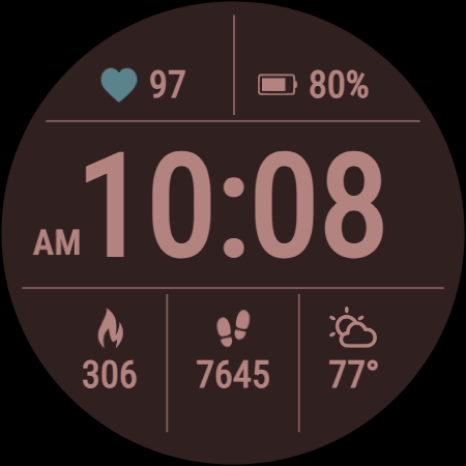
"Digital sport watch face with heart rate, battery, daily stats & 30 colors."
ติดตั้งบน Google Play
แอปเสียเงิน




เกี่ยวกับแอปนี้
Digital and built for clarity: CELEST5651 Sport Watch frames a bold digital clock in a clean, organized grid, with your heart rate, battery, and daily stats laid out where you can read them at speed. Wear OS 5+ required (for weather functions) — Galaxy Watch, Pixel Watch, and all Wear OS 5+ devices.
The high-contrast layout is what makes it work: nothing is decorative, every cell in the grid earns its place, and the result carries from the gym to the office without looking like either. If you'd rather see something else, the calories, steps, and weather cells can each be hidden and replaced with a circular complication of your choice, so you decide which data gets the space.
⚡ Features
- Bold digital clock in an organized grid layout
- High-contrast design for instant readability
- Heart rate, battery, calories, steps, and weather at a glance
- Circular complications in place of the stats you don't need
🎨 Customization
- 30 color variations
- Hide calories, steps, and weather individually
- Use circular complications in the slots you clear
ⓘ About Calorie & Distance Stats
A note on stats: When shown directly on the watch face, calorie and distance values are estimated from your steps based on an average user, because Wear OS doesn't provide this data to watch faces from the watch's sensors. Complications are different — they receive real data from the system. Treat the built-in calorie and distance figures as a helpful approximation rather than an exact measurement.
✅ Compatible Devices
- Google Pixel Watch/2/3/4/5
- OnePlus Watch 2/2R/3/4
- Oppo Watch X2/X3
- Samsung Galaxy Watch 4/4 Classic/5/5 Pro/6/6 Classic/7/8/8 Classic/9/FE/Ultra (2024)/(2025)/Ultra 2
- Xiaomi Watch 2/2 Pro/5
🎁 BOGO Promotion: https://celest-watches.com/bogo/
✨ Explore the complete CELEST collection in one place — including all Wear OS, HUAWEI, and Apple Watch faces, along with our apps and tools — with the CELEST Catalog app: https://play.google.com/store/apps/details?id=com.celestwatches.catalog
🔧 Installation Help
Having trouble? We've got you covered:
- Use the dropdown menu next to "Install" on your phone to select your watch model or install directly from your watch's Play Store app.
- Updating weather data (if the watch face shows weather) may take time after installation but switching to another watch face and switching back or restarting both the watch and phone usually helps.
- Check out our installation and troubleshooting guide: https://celest-watches.com/installation-troubleshooting/
- Contact us at [email protected] for quick support
📞 Support & Community
📧 Support: [email protected]
📱 Follow @celestwatches on Instagram and subscribe to our newsletter to get notified of new releases and deals: https://celest-watches.com/newsletter/
The high-contrast layout is what makes it work: nothing is decorative, every cell in the grid earns its place, and the result carries from the gym to the office without looking like either. If you'd rather see something else, the calories, steps, and weather cells can each be hidden and replaced with a circular complication of your choice, so you decide which data gets the space.
⚡ Features
- Bold digital clock in an organized grid layout
- High-contrast design for instant readability
- Heart rate, battery, calories, steps, and weather at a glance
- Circular complications in place of the stats you don't need
🎨 Customization
- 30 color variations
- Hide calories, steps, and weather individually
- Use circular complications in the slots you clear
ⓘ About Calorie & Distance Stats
A note on stats: When shown directly on the watch face, calorie and distance values are estimated from your steps based on an average user, because Wear OS doesn't provide this data to watch faces from the watch's sensors. Complications are different — they receive real data from the system. Treat the built-in calorie and distance figures as a helpful approximation rather than an exact measurement.
✅ Compatible Devices
- Google Pixel Watch/2/3/4/5
- OnePlus Watch 2/2R/3/4
- Oppo Watch X2/X3
- Samsung Galaxy Watch 4/4 Classic/5/5 Pro/6/6 Classic/7/8/8 Classic/9/FE/Ultra (2024)/(2025)/Ultra 2
- Xiaomi Watch 2/2 Pro/5
🎁 BOGO Promotion: https://celest-watches.com/bogo/
✨ Explore the complete CELEST collection in one place — including all Wear OS, HUAWEI, and Apple Watch faces, along with our apps and tools — with the CELEST Catalog app: https://play.google.com/store/apps/details?id=com.celestwatches.catalog
🔧 Installation Help
Having trouble? We've got you covered:
- Use the dropdown menu next to "Install" on your phone to select your watch model or install directly from your watch's Play Store app.
- Updating weather data (if the watch face shows weather) may take time after installation but switching to another watch face and switching back or restarting both the watch and phone usually helps.
- Check out our installation and troubleshooting guide: https://celest-watches.com/installation-troubleshooting/
- Contact us at [email protected] for quick support
📞 Support & Community
📧 Support: [email protected]
📱 Follow @celestwatches on Instagram and subscribe to our newsletter to get notified of new releases and deals: https://celest-watches.com/newsletter/
ข้อมูลแอป
เวอร์ชัน
อัปเดตเมื่อ
Aug 05, 2026
ขนาด
ต้องการ Android
รหัสแพ็คเกจ
com.watchfacestudio.celest5651
การติดตั้ง
141
หมวดหมู่
Personalization
มีอะไรใหม่
Updated to target Android 16 (API 36).
สิทธิ์ของแอป
-
Other
- view network connections
- full network access
- Google Play license check

คะแนนและรีวิว
0.0
คะแนนทั้งหมด
5
4
3
2
1
L
Luigi Calabrese
Mar 30, 2026
Clean, essential, informative. The right balance between minimalism and completeness of information.


