

CELEST5661 Retro Digital Watch
Personalization




เกี่ยวกับแอปนี้
⚠️ Requires The Fit Data Complication App
Don't install this watch face on its own. The graph is drawn from data supplied by the Fit Data Complication app, so install it and assign the complication slots before you start: https://play.google.com/store/apps/details?id=com.celestwatches.fitdatacomplication
- Video setup guide: https://www.instagram.com/reel/DYwljqotLiK/
- Setting the correct permissions: https://www.instagram.com/p/DY0N1qatcpq/
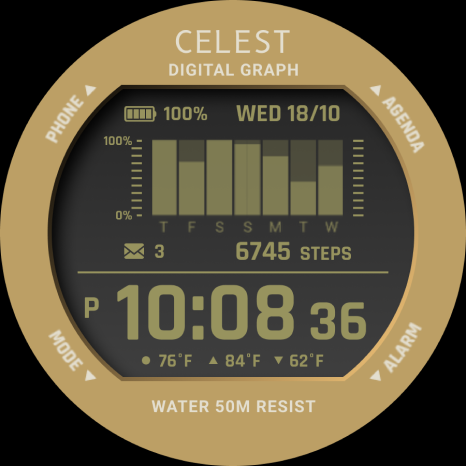
Once configured, the graph tracks weekly steps, calories, distance, floors, and elevation gain, plus an hourly overview of resting heart rate. The mode button on the watch face cycles through the metrics, so you can switch data sources without leaving the dial. Direct shortcuts to the phone, messages, calendar, alarms, and weather apps keep the rest of your day one tap away.
⚡ Features
- Central data tracking graph fed by Fit Data Complication
- Weekly steps, calories, distance, floors, and elevation gain
- Hourly overview of resting heart rate
- Mode button switches between data sources when the complications are set up correctly
- Complication spots designed specifically for Fit Data Complication
- Shortcuts to phone, messages, calendar, alarms, and weather
🎨 Customization
- 10 background options
- 10 LCD background color options
- 30 LCD text color options
Video overview of the customization options: https://www.instagram.com/reel/DYwkjbJtMJV/
✅ Compatible Devices
- Google Pixel Watch/2/3/4/5
- OnePlus Watch 2/2R/3/4
- Oppo Watch X2/X3
- Samsung Galaxy Watch 4/4 Classic/5/5 Pro/6/6 Classic/7/8/8 Classic/9/FE/Ultra (2024)/(2025)/Ultra 2
- Xiaomi Watch 2/2 Pro/5
🎁 BOGO Promotion: https://celest-watches.com/bogo/
✨ Explore the complete CELEST collection in one place — including all Wear OS, HUAWEI, and Apple Watch faces, along with our apps and tools — with the CELEST Catalog app: https://play.google.com/store/apps/details?id=com.celestwatches.catalog
🔧 Installation Help
Having trouble? We've got you covered:
- Use the dropdown menu next to "Install" on your phone to select your watch model or install directly from your watch's Play Store app.
- Updating weather data (if the watch face shows weather) may take time after installation but switching to another watch face and switching back or restarting both the watch and phone usually helps.
- Check out our installation and troubleshooting guide: https://celest-watches.com/installation-troubleshooting/
- Contact us at [email protected] for quick support
📞 Support & Community
📧 Support: [email protected]
📱 Follow @celestwatches on Instagram and subscribe to our newsletter to get notified of new releases and deals: https://celest-watches.com/newsletter/
ข้อมูลแอป
มีอะไรใหม่
สิทธิ์ของแอป
-
Other
- view network connections
- full network access
- Google Play license check

คะแนนและรีวิว
beautiful watchface
I really wanted this one to work. I love the look of it but I can't get the steps to sync up fully. I downloaded the companion app and set everything up but the steps will not sync up. The steps are always a few hundred steps off from the true step count on Samsung health and the watch. Even after sitting untouched it doesn't sync perfectly.
Beautifully done! Another awesome design brother! This looks incredible on my 8 Ultra with my metal case. I'll do a short video showing it off mate 👍🏻
most amazing watchface that mimics and +plus the gshocks feel. i dont put 5 stars only because i cant see my heart data at least on a complication plus the steps on graph i think... or it doesn't seem to be able on the complementary videos of the fit data companion app
Wow, this works so well. what a great innovation. CELEST is definetly making the most out of the limited tools that developers were given. WOW!!! Great job.


