

CFS124 ModernEdge
Personalization



เกี่ยวกับแอปนี้
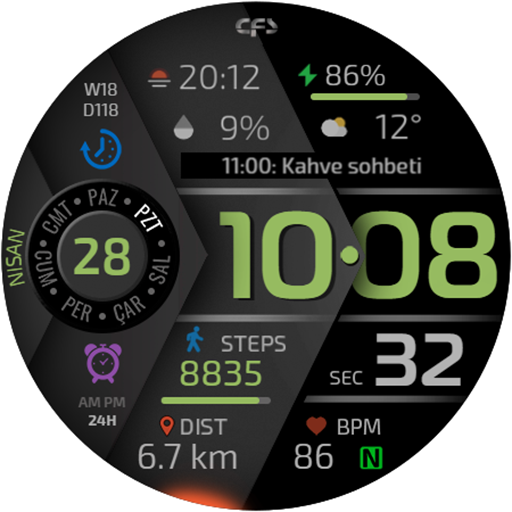
Watch face features:
🕒 Digital time in 12/24-hour format depending on phone settings
📅 Date
🌐 Weekdays in 10 languages*
👣 Steps
🔋 Watch battery level
📏 Moved distance in KM/MI**
❤️ Heart rate
🎨 Multiple color schemes
⚙️ Additional elements and customizable shortcuts
🌙 AOD with 4 brightness levels
* Weekday language:
Please select the required language in the watch face settings.
The following languages are available for weekdays:
English
French
Spanish
Portuguese
German
Russian
Indonesian
Turkish
Italian
Korean
** Distance KM/MI:
Please select kilometers or miles in the watch settings.
The watch face uses an arithmetic formula to calculate the distance:
1 km = 1312 steps
1 mile = 2100 steps
The watch face is designed for users who want a modern digital interface with large time, clearly readable data, and a convenient layout. Date, weekday, steps, moved distance, heart rate, and watch battery level are clearly displayed on the screen.
10 languages are available for the weekday display and can be selected in the watch face settings. You can also choose your preferred color scheme and customize additional elements and shortcuts to suit your daily needs.
ℹ️ Availability of some features, additional elements, weather data, and other displayed information may depend on the watch and phone model, installed apps, permissions, and system settings.
⚙️ The Galaxy Wearable app may not always correctly support customization of complex watch faces. In this case, we recommend customizing the watch face directly on the watch.
To open the watch face settings, touch and hold the watch screen.
⚠️ We can guarantee correct operation of touch zones only on Samsung watches. Their behavior may differ on watches from other manufacturers.
📧 If you experience any difficulties using the watch face, please contact us. We will do our best to help:
[email protected]
🌐 Installation instructions, customization tips, and additional information:
https://cfswatchfaces.com
✈️ TELEGRAM:
https://t.me/CFS_WatchFaces
Thank you for choosing our watch faces!
ข้อมูลแอป
มีอะไรใหม่
คะแนนและรีวิว
Great watchface. Nice graphics with many useful complications. Could you please give the option for full watchface in AOD?
This is my most used theme.. It's Fantastic and I love it
very nice watch face thanks 👍
Great watchface, this is the best one I have purchased as of yet. All the info I was and am looking for and looks great
Nice design with many customization, thanks to the developer for the support,
Great watch face - easy to read, looks great and has a uniqueness with the accents. Good amount of info displayed, and easy access to custom shortcuts. Some more colour options would be nice. Also, the fixed shortcut above the date tries to open an app which does not exist (on the Pixel watch at least).
แอปที่คล้ายกัน

Digital Neror Watch Face

OT | Weather Watch Face 2

Digital Minimal Watch Face

Ballozi TYTAN Tactical Digital

OMG 449 - Digital Watch Face
