Chester Classic Beyond
Personalization




เกี่ยวกับแอปนี้
COMPATIBILITY: Round Wear OS 6+ smartwatches only (not for rectangular watches). If your watch runs an older Wear OS version, please update it before buying. Does NOT work on watches or fitness bands without Wear OS.
HOW TO INSTALL (3 steps)
1. Before buying, make sure your watch runs Wear OS 6 or newer and is connected to your phone with the same Google account.
2. On this page, tap the ▼ arrow next to the Buy/Install button and select your WATCH as the device. You can also buy it directly in Google Play on your watch.
3. On your watch, touch and hold the current watch face, swipe to the end, tap "Add watch face" and choose Chester Classic Beyond.
Not showing up? Keep phone and watch online and open Google Play on the watch. Full guide: https://chesterwf.com/installation-instructions/
Key Features and Highlights:
1. Personalization and Design:
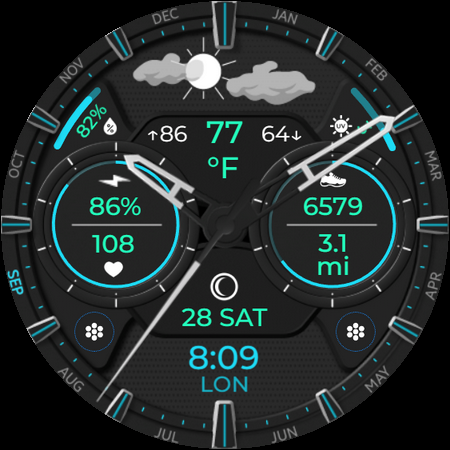
- Choose from 30 different color schemes, allowing you to customize the watch face to match your personal style.
- Select from four types of hour and minute hands, as well as four index styles and three sensor styles, providing a variety of visual options.
2. Weather and Environmental Information:
- Current weather conditions are displayed graphically, with indications of the current, minimum, and maximum temperatures for the day.
- Additional data on humidity levels, UV index, and the option to display temperature in Celsius or Fahrenheit.
- The watch face includes a moon phase function, adding an astronomical element to the design and providing extra information for the user.
3. Fitness and Activity:
- Displays activity levels with step count, distance traveled (in kilometers or miles, adjustable in the settings), and heart rate.
- Quick access to real-time data and activity management through interactive tap zones.
4. Interactive Elements:
- Two zones for quick access to apps, allowing users to easily open desired functions.
- A complication for selecting the information displayed in the lower part of the screen.
5. Always On Display (AOD):
- The watch face offers two AOD styles, helping to conserve battery life while still providing essential information.
The Chester Classic Beyond watch face is not only stylish but also highly functional. It provides detailed weather, health, and activity data, and offers a wide range of customization options for maximum convenience and personalization.
Compatibility:
Compatible with all round Wear OS 6+ devices, such as Google Pixel Watch, Galaxy Watch 7, Galaxy Watch Ultra, and more. Not suitable for rectangular watches.
Support and Resources:
Explore our other watch faces on the Google Play Store: https://play.google.com/store/apps/dev?id=6421855235785006640
Stay updated with our latest releases:
Newsletter and website: https://ChesterWF.com
Telegram channel: https://t.me/ChesterWF
Instagram: https://www.instagram.com/samsung.watchface
For support, contact: [email protected]
Thank you!
ข้อมูลแอป
สิทธิ์ของแอป
-
Wearable sensors/Activity data
- body sensors (like heart rate monitors)
-
Other
- full network access
- reorder running apps
- control vibration
- prevent device from sleeping
- set an alarm


คะแนนและรีวิว
didn't work
Impossible to do on a Pixel Watch 4: change miles to Km, add steps climbed info, add active minutes. Furthermore no refund available !
does not load on samsung watch 8
The weather icons on this watch face are terrific. Having the detailed weather info at the top is really handy. Overall, this watch face has a super cool design, and I highly recommend it.
Not impressed. Limited complication integration, which look terrible on the watchface. Weather panel at the top tries to download a missing app from the play store. Poor choice of built-in colour combinations only; most render items unreadable when applied. Contacted for support and heard nothing back.
Unique Watchface. Simply loved it. All info disllplayed, I needed. Specially the built-in weather app is so nice working that I can recommend it only for the same. 100% recommend. Great job CHESTER WATCH FACES.