

Flowers MOD Season
Personalization
4.2
4.7K+ ดาวน์โหลด
"Seasonal Floral Watch Face for Wear OS"
ติดตั้งบน Google Play
แอปเสียเงิน




เกี่ยวกับแอปนี้
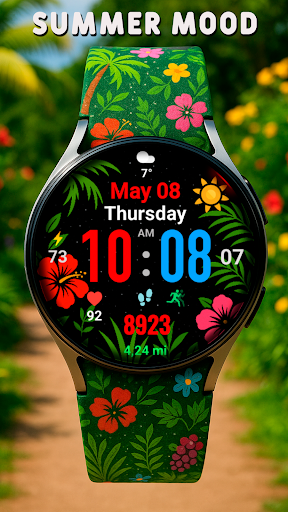
A vibrant seasonal watch face with different designs for all seasons and extensive customization options for Wear OS:
Change themes according to the season
Choose color schemes
Perfect for a summer mood
Here you can choose any time of the year Winter, Spring, Summer and Autumn, enjoy
Compatible with Wear OS devices running API level 30 and above, including Samsung Galaxy Watch 4, 5, 6, 7, 8 and Pixel Watch.
**Installation**
1. Install the watch face app on your phone.
2. Make sure your Wear OS watch is connected to your phone and uses the same Google account.
3. Select your watch as the installation device and complete the installation.
4. After installation, select the watch face from your watch face gallery.
If installation is delayed, check the internet connection on both devices, wait a minute or two, or restart your watch and try again.
**Customization**
• Touch and hold the watch face, then tap **Customize** to access the available settings.
• For the best experience, we recommend configuring the watch face directly on your watch. Video guide:
https://youtu.be/YPcpvbxABiA
**Support**
If you have any questions or installation issues, please contact:
[email protected]
**More watch faces by WIN**
Explore other watch faces:
https://play.google.com/store/apps/dev?id=6789054753742990227
Change themes according to the season
Choose color schemes
Perfect for a summer mood
Here you can choose any time of the year Winter, Spring, Summer and Autumn, enjoy
Compatible with Wear OS devices running API level 30 and above, including Samsung Galaxy Watch 4, 5, 6, 7, 8 and Pixel Watch.
**Installation**
1. Install the watch face app on your phone.
2. Make sure your Wear OS watch is connected to your phone and uses the same Google account.
3. Select your watch as the installation device and complete the installation.
4. After installation, select the watch face from your watch face gallery.
If installation is delayed, check the internet connection on both devices, wait a minute or two, or restart your watch and try again.
**Customization**
• Touch and hold the watch face, then tap **Customize** to access the available settings.
• For the best experience, we recommend configuring the watch face directly on your watch. Video guide:
https://youtu.be/YPcpvbxABiA
**Support**
If you have any questions or installation issues, please contact:
[email protected]
**More watch faces by WIN**
Explore other watch faces:
https://play.google.com/store/apps/dev?id=6789054753742990227
ข้อมูลแอป
เวอร์ชัน
อัปเดตเมื่อ
Sep 20, 2026
ขนาด
ต้องการ Android
รหัสแพ็คเกจ
com.watchfacestudio.naturemodanimation
การติดตั้ง
4.7K+
หมวดหมู่
Personalization
มีอะไรใหม่
Wear OS update:
- New styles added
- New styles added
สิทธิ์ของแอป
-
Other
- full network access

คะแนนและรีวิว
4.2
คะแนนทั้งหมด
5
4
3
2
1
J
Jared Andújar Cabán
Jul 13, 2026
I like it, but drain your battery way to fast. I think the weather its constantly updating
V
Vasya Vasyadghan
Dec 15, 2025
Wow nice watchface
L
Lucio Ferro
Sep 30, 2025
Great watch face.
G
Global Citizen
Sep 30, 2025
Nice and cute watchface to wear with casual dresses. Good job.
E
Evelyn Ireola
Jan 30, 2025
THE BEST
S
Steve Jackson
Nov 25, 2024
Just not as good as the I watch


