

Tancha S78 Informative
Personalization
0.0
774 ดาวน์โหลด
"A watch face designed to offer a multitude of features."
ติดตั้งบน Google Play
แอปเสียเงิน


เกี่ยวกับแอปนี้
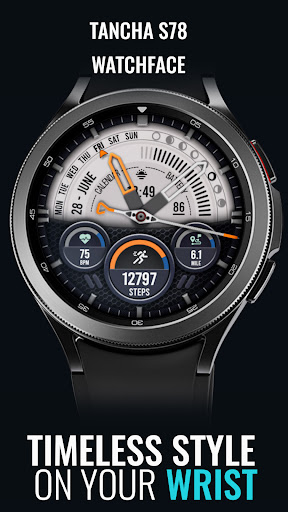
Tancha S78 Informative Watch Face
Stylish watch face with fitness stats, date, time, and moon phases in various color combinations.
This watch face is developed by Tancha Watch Faces for use on Wear OS devices.
FEATURES
Tancha S78 Analog Watch Face
* Customizable color options.
* Date information display.
* Battery information.
* Step counter.
* Distance.
* Heart rate monitor.
* Moon phase.
* Customizable complication.
* Always-on display support.
FAQ :
1- The watch face is installed on your watch but does not appear in the catalog?
FOLLOW THESE STEPS:
Press and hold your watch screen.
Swipe right until you see the text 'Add watch face.'
Press the '+ Add watch face' button.
Find and activate the watch face you installed.
2- If the companion app is installed but the watch face is not, follow the steps below:
FOLLOW THESE STEPS:
Open the companion app on your phone (ensure that your smartwatch is connected to your phone).
Next, tap the 'INSTALL WATCH FACE ON WATCH' button at the bottom of the app.
This will open the Play Store on your WEAR OS smartwatch, displaying the purchased watch face and allowing you to install it directly.
If you have any questions or requests, please don't hesitate to get in touch with me at [email protected].
Thank you sincerely for your support.
Best regards,
Tancha Watch Faces
ข้อมูลแอป
เวอร์ชัน
อัปเดตเมื่อ
N/A
ขนาด
ต้องการ Android
รหัสแพ็คเกจ
com.watchfacestudio.tanchas78
การติดตั้ง
774
หมวดหมู่
Personalization
สิทธิ์ของแอป
-
Other
- view network connections
- pair with Bluetooth devices
- access Bluetooth settings
- full network access

คะแนนและรีวิว
0.0
คะแนนทั้งหมด
5
4
3
2
1
J
Joe Wardia
Jul 31, 2024
This dev. always has very nice wf's but if he would do an update & add miles for distance for us in the U.S. I give it 5 ⭐'s


