
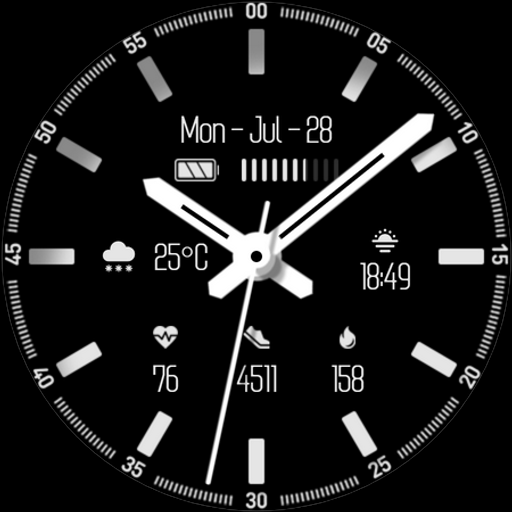
Watch face 10h08.com #55
Personalization
0.0
124 ดาวน์โหลด
"High resolution. 3 styles of AOD. Complication. 30 Themes color palette."
ติดตั้งบน Google Play
แอปเสียเงิน


เกี่ยวกับแอปนี้
⌚️ Watch face 10h08.com #55
🟥 Information:
- High resolution, sharp image quality
- Sport watch face
- Analog time
- Day, date and month
- Weather
- Sunrise & sunset
- Steps count, heart rate, calories
- Battery level
- 3 styles of AOD
- Complication
- 30 Themes color palette
- Battery optimization
🟨 How to custom this watch face?
1. Press and hold watch face screen
2. Tap “Customize” button
3. Swipe left or right, up or down to customize watch face
🟦 How to install watch face on your watch?
1. Install watch face from Google Play store
2. Press and hold watch face screen
3. Swipe right to left and tap “Add watch face”
4. Scroll to the bottom of the page and selectwatch face in the “downloaded” section
🟧 Compatible with smart watches running Wear OS 5+ SDK 34+
For example: Galaxy Watch 6, Galaxy Watch 7 Ultra, Ticwatch Pro 5, Pixcel Watch 2, Watch 2 Pro,...
🟩 See all my watch faces: https://play.google.com/store/apps/dev?id=5487081600241990978
🟪 Follow my social media pages for the latest watch face updates:
https://www.facebook.com/cnwwatchface
https://www.instagram.com/cnwwatchface
https://www.pinterest.com/cnwwatchface
https://x.com/cnwwatchface
https://www.threads.com/@cnwwatchface
ข้อมูลแอป
เวอร์ชัน
1.0.0
อัปเดตเมื่อ
Jul 28, 2025
ขนาด
ต้องการ Android
รหัสแพ็คเกจ
com.watchfacestudio.wf10h08com55
การติดตั้ง
124
หมวดหมู่
Personalization
มีอะไรใหม่
Release
คะแนนและรีวิว
0.0
คะแนนทั้งหมด
5
4
3
2
1
A
AppTrove
Aug 05, 2025
The customizable complication at 3 o'clock is showing in white, instead of using theme colour. Please fix this.
แอปที่คล้ายกัน

Watch face 10h08.com #70
10h08.com - Wear Os Watch Face
0.0

Simplicity Analog 6
GW Watchfaces
0.0

MJ157 Bold Elegant Analog
MJ Watchfaces
0.0

Watch face 10h08.com #75
10h08.com - Wear Os Watch Face
0.0

Minimal - Analog - RE29
RECREATIVE Watch Faces
4.4

Chrono Minimal Watch Face
Regarder Watch Faces
0.0