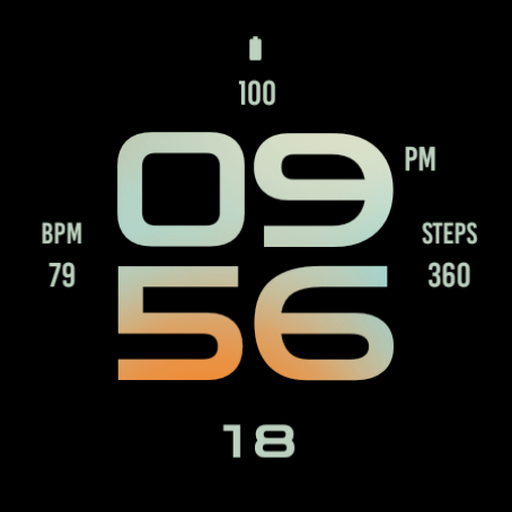
Peach Light Watch Face
Personalization
0.0
545 ดาวน์โหลด
"Beautiful digital watch face for Wear OS"
ติดตั้งบน Google Play
แอปเสียเงิน


เกี่ยวกับแอปนี้
Peach Light Watch Face for Wear OS, stylish digital watch face made with beautiful design focused on legibility and usability.
Main Features:
- Easy to read digital time display
- 12/24 hours mode based on device settings
- AM/PM marker
- Battery level status
- Date
- Customizable widget complications: Add steps, heart rate, weather, and more.
- Customizable app shortcut
- Always on display mode for low-power visibility
- Built for Wear OS smartwatches
Custom Widget Complications:
- SHORT_TEXT complication
- SMALL_IMAGE complication
- ICON complication
Installation:
- Make sure the watch device is connected to the phone
- On the Play Store, select your watch device from the install drop-down button. Then tap install.
- After a few minutes the watch face will installed on your watch device
- Alternatively, you can install the watch face directly from on-watch Play Store by searching this watch face name between quotation marks.
Note:
Widget complications shown in the application description are for promotional only. Custom widget complications data depends on your installed applications and watch manufacturer software. The companion app is only to make it easier to find and install the watch face on your Wear OS watch device.
Main Features:
- Easy to read digital time display
- 12/24 hours mode based on device settings
- AM/PM marker
- Battery level status
- Date
- Customizable widget complications: Add steps, heart rate, weather, and more.
- Customizable app shortcut
- Always on display mode for low-power visibility
- Built for Wear OS smartwatches
Custom Widget Complications:
- SHORT_TEXT complication
- SMALL_IMAGE complication
- ICON complication
Installation:
- Make sure the watch device is connected to the phone
- On the Play Store, select your watch device from the install drop-down button. Then tap install.
- After a few minutes the watch face will installed on your watch device
- Alternatively, you can install the watch face directly from on-watch Play Store by searching this watch face name between quotation marks.
Note:
Widget complications shown in the application description are for promotional only. Custom widget complications data depends on your installed applications and watch manufacturer software. The companion app is only to make it easier to find and install the watch face on your Wear OS watch device.
ข้อมูลแอป
เวอร์ชัน
อัปเดตเมื่อ
N/A
ขนาด
ต้องการ Android
รหัสแพ็คเกจ
wear.watchfaces.peachlightwatchface
การติดตั้ง
545
หมวดหมู่
Personalization
สิทธิ์ของแอป
-
Other
- Google Play license check

คะแนนและรีวิว
0.0
คะแนนทั้งหมด
5
4
3
2
1
C
C
Jan 25, 2026
color combination setting does not work
R
Robin
Jun 02, 2024
I am LOVING ❤️ ❤️ ❤️ the watchfaces from this dev. Simple and clean designs with all the information I require at a glance. These are perfect faces for visually impaired people like me. The bright colors on dark black backgrounds make seeing the large time easy without squinting. Great job.
แอปที่คล้ายกัน

Active Peach Watch Face
zolawatchfaces
0.0

Beauty Sand Light Watch Face
zolawatchfaces
0.0

Giraffe Watch Face
zolawatchfaces
0.0

Watermelon Large Watch Face
zolawatchfaces
0.0

Soft Purple Light Watch Face
zolawatchfaces
0.0

Peach Line Watch Face
zolawatchfaces
0.0