

BioSky-X - Watch Face
Personalization


Bu uygulama hakkında
[ Only for Wear OS 5+ devices (API 34+)]
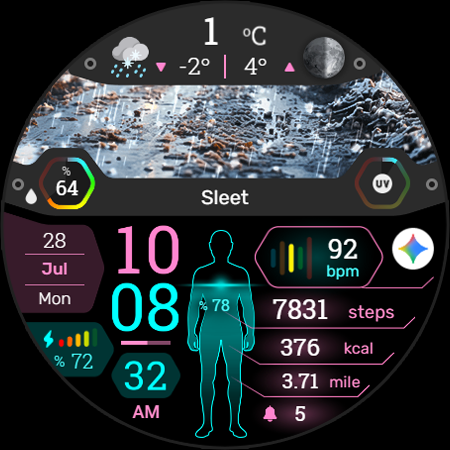
♾️ Sync your body, read the sky!
FEATURES
● 🌤️ Weather images by weather conditions (Different images for day and night)
● 🌡️ Weather with High - Low temperature
● 🌧️ Chance of precipitation and Ultraviolet index with indicators
● 🎨 Animated human and 30 Colour variants
● 📊 Steps - Distance - Calories - Battery - Heart rate - Calendar - 1 adjustable shortcut - Notification - Live moon phases
● 🕒 12/24 H (Based on your phone time setting)
● 🚧 Km/Mil supported (Automatically selected based on phone language (in United States and United Kingdom))
● 👀 Always on display supported
📌 INSTALLATION NOTES:
1 - 🔗 Ensure your watch is properly connected to your phone. Open the Phone App on your phone and tap on "DOWNLOAD TO THE WATCH", then follow the instructions on your watch.
⌛ A few minutes after tapping the install button on your watch, the watch face will be installed. You can then select your new watch face!
📱 The phone app serves as a placeholder to make it easier to install and find the watch face on your Wear OS device.
⚠️ Note: If you find yourself stuck in a payment loop, don’t worry! You will only be charged once, even if prompted to pay again. Wait 5 minutes or restart your watch and try again. This could be a synchronization issue between your device and Google servers.
2 - 💻 Alternatively, you can try installing the watch face from a web browser on your PC.
⚠️ Please note that any issues on this side are NOT developer-dependent. The developer has no control over the Play Store from this side. Thank you.
🔑 For full functionality, please manually enable Sensors & receive complication data permissions!
WEB
https://www.ekwatchfaces.com
https://www.instagram.com/ekwatchfaces
https://www.facebook.com/ekwatchfaces
https://twitter.com/ekwatchfaces
https://www.pinterest.com/ekwatchfaces
YOUTUBE
https://bit.ly/2TowlDE
Uygulama Bilgisi
Yenilikler
Uygulama İzinleri
-
Other
- pair with Bluetooth devices
- access Bluetooth settings
- control vibration
- Google Play license check

Puanlar ve Yorumlar
Greate face! Any chance you can add various AOD dimming modes? The current dimming mode make it look very dull. Some of us have watches with big batteries and we dont mind if nothing goes dim on the face in AOD. Also, a toggle for imperial|metric will be helpful.
Good watchface but I cannot configure weather. Weather not working and there is no weather animation as well. (weather location is the issue)
It's great, but please give options to change the weather unit to Celsius and the distance unit to km.
the weather display never updated. There was no option to enable it or switch from Celsius to Fahrenheit.
top half of the screen complications aren't working like weather n temp,any ideas if working ill up the stars
doesn't work on watch 7


