




Bu uygulama hakkında
Auto+ is designed to be used with the particular model infotainment system, there are five modes to enhance the connectivity between the infotainment and your smartphone.
You can control the infotainment anywhere from your car once the Bluetooth is connected, watch online video streaming, sync your personal calendar, share current locations, last mile destination and project your google map for navigation.
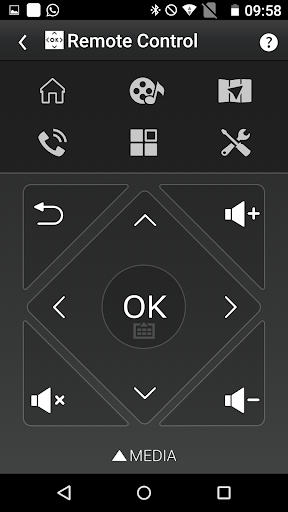
Auto+ Remote control mode:
Control navigation and media playback with single tap. Switch the Car Launcher with flick of your finger or quickly tap out the POI name instead of clicking the letter on the infotainment system screen.
Auto+ Car App mode(*Require MHL cable):
Use MHL cable connect infotainment to watch online video streaming, and also to sync your personal calendar via smartphone.
Auto+ Share Location mode:
Share locations from cell phone and start navigation by infotainment.
Auto+ Last mile mode:
Use last mile navigation guiding you from your car to destination and back.
Auto+ Google map projection:
Connect HDMI and then you can able to project your smartphone’s Google map screens on the Infotainment system.
You can use Auto+ to:
- Control the infotainment system
- Control media playback
- Control car launcher
- Enter text with Keyboard
- Watch online video streaming (*Require MHL cable)
- Sync up your personal calendar (*Require MHL cable)
- Share locations from cell phone
- Use last mile navigation guiding you to the destination
- Project Google map screens on the Infotainment system. (*Require MHL cable)
Auto+ Requirement:
- Requires a device with Android 4.2 or later to use Auto+.
- Requires a Bluetooth LE connection to the infotainment to use Auto+.
Auto+ Quick guide:
1. Install Auto+
2. Click "Auto+ Connect" on the infotainment, and select Android mode.
3. Launch Auto+ and it will automatically connect.
Enjoy our Auto+.
You can control the infotainment anywhere from your car once the Bluetooth is connected, watch online video streaming, sync your personal calendar, share current locations, last mile destination and project your google map for navigation.
Auto+ Remote control mode:
Control navigation and media playback with single tap. Switch the Car Launcher with flick of your finger or quickly tap out the POI name instead of clicking the letter on the infotainment system screen.
Auto+ Car App mode(*Require MHL cable):
Use MHL cable connect infotainment to watch online video streaming, and also to sync your personal calendar via smartphone.
Auto+ Share Location mode:
Share locations from cell phone and start navigation by infotainment.
Auto+ Last mile mode:
Use last mile navigation guiding you from your car to destination and back.
Auto+ Google map projection:
Connect HDMI and then you can able to project your smartphone’s Google map screens on the Infotainment system.
You can use Auto+ to:
- Control the infotainment system
- Control media playback
- Control car launcher
- Enter text with Keyboard
- Watch online video streaming (*Require MHL cable)
- Sync up your personal calendar (*Require MHL cable)
- Share locations from cell phone
- Use last mile navigation guiding you to the destination
- Project Google map screens on the Infotainment system. (*Require MHL cable)
Auto+ Requirement:
- Requires a device with Android 4.2 or later to use Auto+.
- Requires a Bluetooth LE connection to the infotainment to use Auto+.
Auto+ Quick guide:
1. Install Auto+
2. Click "Auto+ Connect" on the infotainment, and select Android mode.
3. Launch Auto+ and it will automatically connect.
Enjoy our Auto+.
Uygulama Bilgisi
Sürüm
1.5.8
Güncellenme tarihi
Dec 16, 2025
Boyut
Android Gerektirir
8.0
Paket Kimliği
com.garmin.android.apps.autoplus
Yüklemeler
164.5K+
Kategori
Tools
Yenilikler
This version contains app improvements and enhancements to user experience.
Uygulama İzinleri
-
Device & app history
- retrieve running apps
-
Identity
- find accounts on the device
- add or remove accounts
-
Calendar
- read calendar events plus confidential information
- add or modify calendar events and send email to guests without owners' knowledge
-
Contacts
- find accounts on the device
- read your contacts
-
Location
- approximate location (network-based)
- precise location (GPS and network-based)
-
Phone
- read phone status and identity
-
Photos/Media/Files
- access USB storage filesystem
- read the contents of your USB storage
- modify or delete the contents of your USB storage
-
Storage
- read the contents of your USB storage
- modify or delete the contents of your USB storage
-
Device ID & call information
- read phone status and identity
-
Other
- press keys and control buttons
- update component usage statistics
- Google mail
- view network connections
- pair with Bluetooth devices
- access Bluetooth settings
- full network access
- read sync settings
- use accounts on the device
- control vibration
- prevent device from sleeping
- read Google service configuration


Puanlar ve Yorumlar
2.8
Toplam puanlar
5
4
3
2
1
m
mpshindinge シ
Jan 16, 2026
I just love the way you can control everything on the system unit on the phone, however they need to add features like app shortcuts, the control center, other than that, this app is worth all 5 stars.
N
Naveen Giliyar
Jul 09, 2025
its a waste app
H
Hamza Hammad
Mar 18, 2025
good, BUT WHY CANT I USE ANDROID AUTO, BCUZ YOU WANT ME TO PAY A TON OF MONEY TO UPDATE THE MAP EVERY YEAR
F
Fritz Jed Correa
Mar 16, 2025
Useless.
E
Elvis swenyeho
Apr 20, 2023
This app is very helpful
A
Abdulrhman A
Nov 10, 2022
As remote control app


