

WIN Snowfall Digital Pro
Personalization
0.0
219 İndirmeler
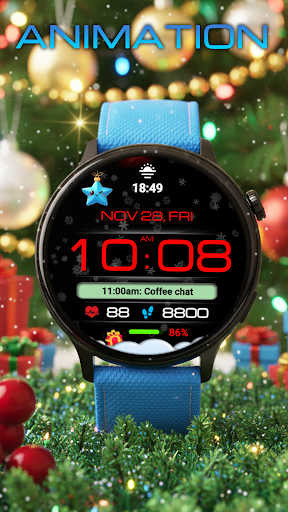
"Christmas digital display with living, beautiful snow"
Google Play'de Yükle
Ücretli Uygulama





Bu uygulama hakkında
Snowfall Digital Pro: The perfect blend of style and functionality. Enjoy mesmerizing animations of falling snow right on your wrist. A clear digital display and comprehensive information will make your winter comfortable and beautiful.
A practical, animated New Year's watch face for Wear OS
Basic moments
- A high resolution;
- Digital time in 12\24 hour format.
- Changeable colors
- Custom complications
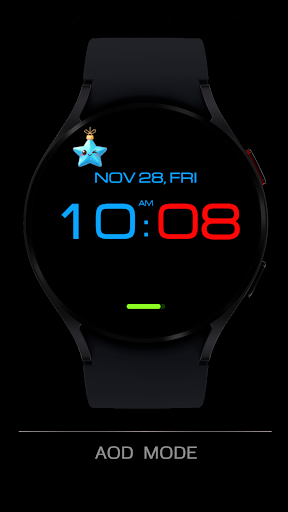
- AOD mode
Compatible with Wear OS devices running API level 30 and above, including Samsung Galaxy Watch 4, 5, 6, 7, 8 and Pixel Watch.
**Installation**
1. Install the watch face app on your phone.
2. Make sure your Wear OS watch is connected to your phone and uses the same Google account.
3. Select your watch as the installation device and complete the installation.
4. After installation, select the watch face from your watch face gallery.
If installation is delayed, check the internet connection on both devices, wait a minute or two, or restart your watch and try again.
**Customization**
• Touch and hold the watch face, then tap **Customize** to access the available settings.
• For the best experience, we recommend configuring the watch face directly on your watch. Video guide:
https://youtu.be/YPcpvbxABiA
**Support**
If you have any questions or installation issues, please contact: [email protected]
**More watch faces by WIN**
Explore other watch faces:
https://play.google.com/store/apps/dev?id=6789054753742990227
Uygulama Bilgisi
Sürüm
Güncellenme tarihi
N/A
Boyut
Android Gerektirir
Paket Kimliği
com.watchfacestudio.SnowfallDigitalPro
Yüklemeler
219
Kategori
Personalization
Uygulama İzinleri
-
Other
- full network access
- Google Play license check

Puanlar ve Yorumlar
0.0
Toplam puanlar
5
4
3
2
1
G
Global Citizen
Nov 06, 2025
Nice watchface. Very beautiful.
P
Pam Myers
Nov 06, 2025
Great watchface. Easy to read and customize. Definitely recommend!
P
Patrik Sodoma
Nov 06, 2025
great festive watchface!


