

AWD Cloud Candy watchface
Personalization
0.0
237 İndirmeler
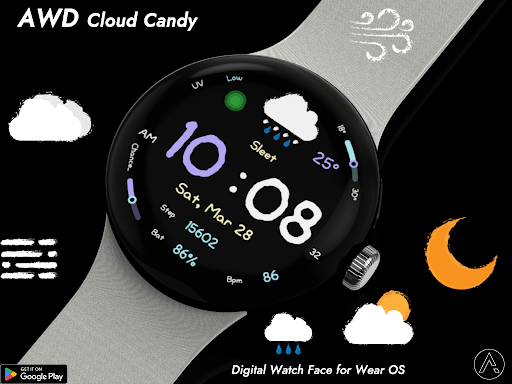
"Clear digital watch face with intuitive weather icons."
Google Play'de Yükle
Ücretli Uygulama




Bu uygulama hakkında
Readability: Large digital clock with a unique, friendly font.
Weather at a glance: Easy-to-understand icons for current conditions.
Daily Stats: Tracks your steps, heart rate, and battery level.
Simplicity: A minimalist layout that focuses on essential information.
Features
• Weather condition icon
• Temp , Low & High temperature progress bar
• UV indicator
• Step count
• Battery %
• Heart rate
• 12/24H
• Change of precipitation progress bar
• Day / Date
Customizing
Customization
• 16 Color style change
• Blingking ON/OFF
• 3 App shortcut
- Support wear OS
- Square screen watch mode is not supported.
***Installation Guide***
The mobile app guides you through the watch face installation process.
You can delete the mobile app once the watch face installation is complete.
1. Your watch and phone must be connected via Bluetooth.
2. Tap the "Install" button in the mobile guide app.
3. Follow the instructions to install the watch face. It will take only a few minutes.
You can also search for and install watch faces directly from the Google app on your watch.
You can also search for and install watch faces from a mobile web browser.
Send feedback : [email protected]
Weather at a glance: Easy-to-understand icons for current conditions.
Daily Stats: Tracks your steps, heart rate, and battery level.
Simplicity: A minimalist layout that focuses on essential information.
Features
• Weather condition icon
• Temp , Low & High temperature progress bar
• UV indicator
• Step count
• Battery %
• Heart rate
• 12/24H
• Change of precipitation progress bar
• Day / Date
Customizing
Customization
• 16 Color style change
• Blingking ON/OFF
• 3 App shortcut
- Support wear OS
- Square screen watch mode is not supported.
***Installation Guide***
The mobile app guides you through the watch face installation process.
You can delete the mobile app once the watch face installation is complete.
1. Your watch and phone must be connected via Bluetooth.
2. Tap the "Install" button in the mobile guide app.
3. Follow the instructions to install the watch face. It will take only a few minutes.
You can also search for and install watch faces directly from the Google app on your watch.
You can also search for and install watch faces from a mobile web browser.
Send feedback : [email protected]
Uygulama Bilgisi
Sürüm
Güncellenme tarihi
N/A
Boyut
Android Gerektirir
Paket Kimliği
com.watchfacestudio.awd_cloud_candy
Yüklemeler
237
Kategori
Personalization
Uygulama İzinleri
-
Other
- Google Play license check


