

CELEST1900 Military Watch
Personalization
0.0
456 İndirmeler
"Military watch face with 24-hour scale, 10 background colors & hand options."
Google Play'de Yükle
Ücretli Uygulama




Bu uygulama hakkında
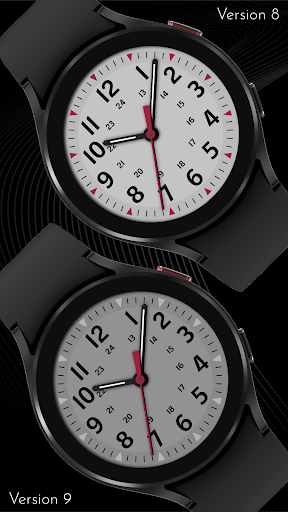
A military field dial you can dress any way you like. CELEST1900 Military Watch puts large hour numerals on a dark, flat face with a smaller 24-hour scale printed inside them, so the afternoon hours can be read directly rather than converted.
An outer marker ring with triangles at the quarters frames the dial, and outlined hour and minute hands run over it with a thin seconds hand behind. What sets this military watch face apart is how far the palette goes: 10 background color options, 6 hour marker color options that override the background, a choice of white or black hour and minute hands, and a white, orange or red seconds hand. The dial itself stays fixed, with no complication slots to fill.
⌚ Features
- Flat field dial with large hour numerals
- Inner 24-hour scale for military time
- Outer marker ring with triangle markers at the quarters
- Outlined hour and minute hands
- Thin sweeping seconds hand
🎨 Customization
- 10 background color options
- 6 hour marker color options that override the background
- White or black hour and minute hands
- White, orange or red seconds hand
- No complication slots: the layout stays as designed
A legible military watch face for people who want a proper field dial and full control over its colors.
✅ Compatible Devices
- Google Pixel Watch/2/3/4/5
- OnePlus Watch 2/2R/3/4
- Oppo Watch X2/X3
- Samsung Galaxy Watch 4/4 Classic/5/5 Pro/6/6 Classic/7/8/8 Classic/9/FE/Ultra (2024)/(2025)/Ultra 2
- Xiaomi Watch 2/2 Pro/5
🎁 BOGO Promotion: https://celest-watches.com/bogo/
✨ Explore the complete CELEST collection in one place — including all Wear OS, HUAWEI, and Apple Watch faces, along with our apps and tools — with the CELEST Catalog app: https://play.google.com/store/apps/details?id=com.celestwatches.catalog
🔧 Installation Help
Having trouble? We've got you covered:
- Use the dropdown menu next to "Install" on your phone to select your watch model or install directly from your watch's Play Store app.
- Updating weather data (if the watch face shows weather) may take time after installation but switching to another watch face and switching back or restarting both the watch and phone usually helps.
- Check out our installation and troubleshooting guide: https://celest-watches.com/installation-troubleshooting/
- Contact us at [email protected] for quick support
📞 Support & Community
📧 Support: [email protected]
📱 Follow @celestwatches on Instagram and subscribe to our newsletter to get notified of new releases and deals: https://celest-watches.com/newsletter/
Uygulama Bilgisi
Sürüm
Güncellenme tarihi
Aug 05, 2026
Boyut
Android Gerektirir
Paket Kimliği
com.watchfacestudio.celest_ad1900
Yüklemeler
456
Kategori
Personalization
Yenilikler
Updated to target Android 16 (API 36).
Uygulama İzinleri
-
Other
- view network connections
- full network access

Puanlar ve Yorumlar
0.0
Toplam puanlar
5
4
3
2
1
T
Timothy Snider
Oct 24, 2026
So far this app to show me how good it really can be
B
Brendon Hall
Aug 22, 2022
Yep, these millitary faces are awesome. The best I've ever found. They just work. Not overly realistic but a perfect mix of abstract and realism and it looks beautiful on your watch. Great work.


