
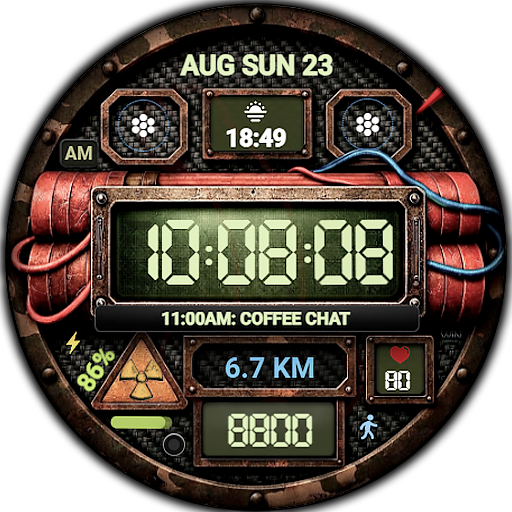
Digital Nuclear DINAMITE PRO
Personalization
0.0
176 Завантаження
"bold post-apocalyptic digital watch face for Wear OS"
Встановити в Google Play
Платное приложение


Про цей додаток
Digital Nuclear DINAMITE PRO – bold post-apocalyptic digital watch face for Wear OS
Highlights:
- 12/24 hour time format
- Date
- Day
- Battery
- Heart rate
- High resolution
- Ability to change styles
- Ability to change color
- Custom complications
- AOD mode
Compatible with Wear OS devices running API level 30 and above, including Samsung Galaxy Watch 4, 5, 6, 7, 8 and Pixel Watch.
**Installation**
1. Install the watch face app on your phone.
2. Make sure your Wear OS watch is connected to your phone and uses the same Google account.
3. Select your watch as the installation device and complete the installation.
4. After installation, select the watch face from your watch face gallery.
If installation is delayed, check the internet connection on both devices, wait a minute or two, or restart your watch and try again.
**Customization**
• Touch and hold the watch face, then tap **Customize** to access the available settings.
• For the best experience, we recommend configuring the watch face directly on your watch. Video guide:
https://youtu.be/YPcpvbxABiA
**Support**
If you have any questions or installation issues, please contact: [email protected]
**More watch faces by WIN**
Explore other watch faces:
https://play.google.com/store/apps/dev?id=6789054753742990227
Інформація про додаток
Версія
Оновлено
N/A
Розмір
Вимагає Android
ID пакету
com.watchfacestudio.nuclearDinamiteMod2
Установок
176
Категорія
Personalization
Дозволи програми
-
Other
- full network access
- Google Play license check

Оцінки та відгуки
0.0
Всього оцінок
5
4
3
2
1
D
D H (WrathDh)
Mar 01, 2026
Awesome design. All the details that are put into the artwork. Great color choices and shadows. Excellent information layout and custom complication work. Super nice job!!!
L
Luke
Mar 01, 2026
Love it, fun graphics, tons of customization, and lots of complication slots!


