

Durval Digital Watch Face
Personalization




Про цей додаток
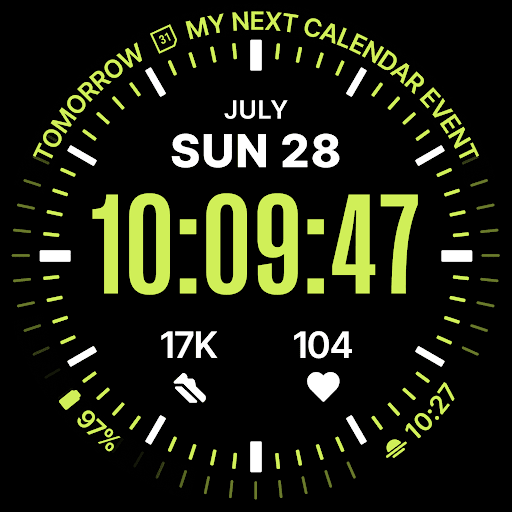
It takes the field watch tradition that defines Durval and puts the time front and center: large, high-contrast digits sitting on a clean black dial, stripped of everything that doesn't earn its place. Hours, minutes, seconds, all in one solid block you can read without looking twice. Nothing decorative. Nothing in the way.
Complications follow the curve of the bezel rather than piling up around the time. Your next calendar event arcs along the top, while the rest sit close to the edge, out of the way, readable in an instant. Every slot is fully customizable: assign steps, heart rate, battery, an alarm, or anything else your watch supports, and set up exactly what you need. The result is a dial that carries real information without ever looking busy.
The full date stays right under the time: weekday, month, and day, spelled out and easy to scan.
A leading-zero toggle lets you set the hour exactly the way you like it.
When your wrist drops, Durval Digital transitions into Always-on Display with a smooth animated fade. The seconds step aside, the dial settles, and what's left stays clean and unobtrusive. A flick of the wrist brings the full glanceable layout back instantly.
An AoD dim option and a night mode that shifts the whole dial to a red tint keep it comfortable in the dark.
Build the look to match how you wear it: multiple independent color pickers with 70+ shades each, and multiple bezel styles ranging from a bare edge to a detailed minute track.
Optional Time Flies companion app is also available to help you install your watch face or keep track of new releases.
Features:
Large digital time with hours, minutes, and seconds
Leading-zero toggle
Full date: weekday, month, day
Arc complications: calendar event text wraps along the top bezel
Four customizable complication slots: assign steps, heart rate, battery, alarm, or any supported complication
Multiple independent color pickers, 70+ shades each
Seven bezel styles
Night mode (red tint)
Animated Always-on Display transition
AoD dim on/off
Built with WFF4 for Wear OS 5.1 and later
Інформація про додаток
Що нового
Дозволи програми
-
Other
- receive data from Internet
- view network connections
- full network access
- prevent device from sleeping

Оцінки та відгуки
Good, but definitely need options to hide complications in AOD mode.
Could an option be implemented to disable the seconds display or make it smaller? The transition to Always On Display (AOD) isn't smooth. The animation could be better masked on the Pixel Watch 4.
Another excellent watch face. What I really like about this watch face is that it's highly customisable.
🇺🇸
all this app needs are 2 or 3 customizable app shortcuts. I dont use this for that reason
update: it was a glitch where I restarted my watch and it back to normal. reached out and was helped remedy the situation. thanks. "can't remove the seconds and it's all bunched up the seconds and minutes. too late to get a refund. can't you update to remove the seconds."


