

RE69 - Realistic Analog
Personalization
0.0
223 Lượt tải
"Analog Wear Os Watch - Smart Casual - Black Background - Classic Watch"
Cài đặt trên Google Play
Ứng dụng trả phí




Về ứng dụng này
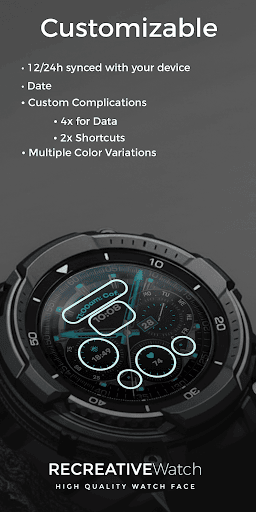
A minimalist Wear OS watch face design, emphasizing simplicity and ease of use. It features a clean, uncluttered display with essential information such as time and date, presented in a sleek and straightforward manner.
Powered by Watch Face Format
⚙️ Phone App Features
The phone app is simply a tool to facilitate installation and locating the watch face on your Wear OS watch. Only the mobile app contains ads.
⚙️ Watch Face Features
• Hour Format Synced With Device (12/24h)
• Date Indicator
• Progress Bar for Battery / Progress Bar for Steps
• 4 Customizable Complications (Appointments Slot)
• 2 Customizable Shortcuts
• Multiple Color Variations
• Always On Display Mode
Complications can be added in place of the Battery Progress Bar or Steps Progress Bar. To display the progress bar again, simply set the complication to "No data", and the corresponding progress bar will reappear.
🎨 Customization
1 - Touch and hold display
2 - Tap on Customize option
🎨 Complications
Touch and hold display to open customization mode. You can customize the field with any data you want.
🔋 Battery
For better battery performance of the watch, we recommend disabling the "Always On Display" mode.
✅ Compatible devices include Google Pixel, Galaxy Watch 4, 5, 6, 7, 8 and other Wear OS models.
Installation and troubleshooting
Follow this link: https://www.recreative-watch.com/help/#installation-methodes
Watch faces don't automatically apply on your watch screen after the installation. That's why you must set it on your watch's screen.
💌 Write to [email protected] for assistance.
Thông tin ứng dụng
Phiên bản
Cập nhật vào
N/A
Kích thước
Yêu cầu Android
ID gói
com.A0Re.recreative69
Lượt cài đặt
223
Danh mục
Personalization
Quyền ứng dụng
-
Other
- receive data from Internet
- view network connections
- full network access
- prevent device from sleeping
- Google Play license check


