

Naver SmartBoard - Keyboard
Tools


Về ứng dụng này
You also can use stickers or your own drawings.
Take a look at NAVER SmartBoard, a keyboard app that just fits you.
1. It gests smarter as you use it.
You can use suggestions from SmartBoard such as words, corrections, or emojis.
Custom texts help you enter long sentences each with a single tap while Quick Keys let your favorite shortened phrases stay in a single key.
You can not only change Korean syllables to Chinese characters but also type with your voice.
2. Search while you keep texting
You don't have to switch to a search app during a conversation.
Finding information of restaurants, movies, weather, and shopping has never been easier.
Stay where you are and get things done!
3. Real-time translation as you type in.
Don't be afraid of texting or emailing with foreigners any more.
Just type in Korean and SmartBoard does the rest translating into English, Chinese (Simplified), or Japanese using N2MT technology.
Using voice recognition while translating is even useful.
4. A single image wins the speech.
Sometimes it's a lot better to show a picture than to describe in words.
Send stickers, gifs, and your own drawings either on a empty canvas or pictures in gallery!
5. Customize your keyboard
Accustomed to a certain Korean layout? SmarBoard supports major Korean layouts such as "2-set Korean", "Danmoum", "Cheonjiin", "Naratgul", and "Vega".
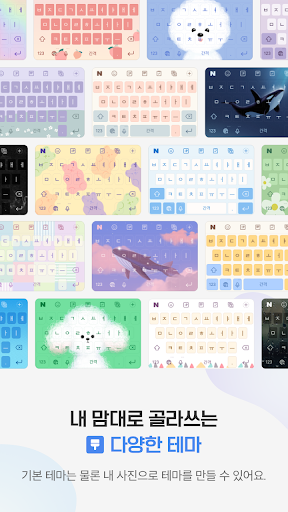
You also can set any images for the keyboard background.
※ Permission Required
- Location: SmartBoard can show the weather around you and local search results.
- Microphone: What you say is transformed to texts using voice recognition.
- Camera: For drawing and text recognition, you can use your camera.
Thông tin ứng dụng
Có gì mới
Quyền ứng dụng
-
Device & app history
- retrieve running apps
-
Identity
- add or remove accounts
-
Location
- approximate location (network-based)
- precise location (GPS and network-based)
-
Camera
- take pictures and videos
-
Microphone
- record audio
-
Wi-Fi connection information
- view Wi-Fi connections
-
Other
- view network connections
- create accounts and set passwords
- change network connectivity
- full network access
- use accounts on the device
- control vibration


Đánh giá và nhận xét
okay i love how cute this app is i only have one suggestion can we add polish as a language cause its like my main language besides english thank you bye♡
no other languages apart from English?!
The issue of the keyboard getting stuck below the navigation buttons has been present for months now. When will you ever care to fix it?
Straightforward app. Wish there was a photo rotate when cropping custom photo. Wish the comma can be left side of the space bar. 1.14.4 for some reason vibrate on keypress is not working on REDMAGIC 11 Pro. I keep messing up when typing. Auto capialize does not always work like ie i when referring to me.
10/10 amazing keyboard!! i can type korean easily and i can finally type hanja
I had been use this app for a long time. And you can tell the app it is really my favourite because default keyboard can be problem sometimes and this is the solution.


