

ReS28 - Seasonal Watch Face
Personalization
3.6
12.8K+ Lượt tải
"Wear OS Watch Face - Floral & Festive - Flowers for all seasons"
Cài đặt trên Google Play
Ứng dụng trả phí




Về ứng dụng này
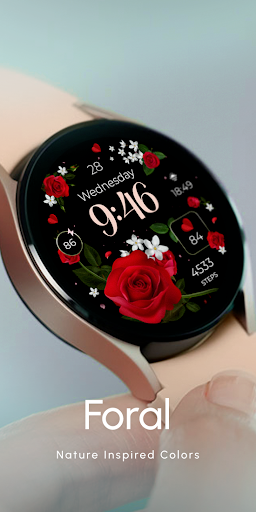
Wear OS watch face: A seasonal delight 🌸🌼☀️🍁❄️! Discover moods for saint patrick, spring, summer, fall, winter, Valentine's Day and the festive Christmas spirit 🎄. Perfect for everyone!
Powered by Watch Face Format
⚙️ Phone App Features
The phone app is simply a tool to facilitate installation and locating the watch face on your Wear OS watch. Only the mobile app contains ads.
⚙️ Watch Face Features
- 12/24hr Digital Time
- Date
- Battery
- Heart rate
- Steps Count
- 2 customizable shortcut
- 2 customizable complications
- Low Battery Consumption
- 10 Backgrounds
- Color Variations
- Always ON Display
🎨 Customization
1 - Touch and hold display
2 - Tap on Customize option
🎨 Complications
Touch and hold display to open customization mode. You can customize the field with any data you want.
🔋 Battery
For better battery performance of the watch, we recommend disabling the "Always On Display" mode.
✅ Compatible devices include API level 33+ Google Pixel, Galaxy Watch 4, 5, 6, 7 and other Wear OS models.
Installation and troubleshooting
Follow this link: https://www.recreative-watch.com/help/#installation-methodes
Watch faces don't automatically apply on your watch screen after the installation. That's why you must set it on your watch's screen.
💌 Write to [email protected] for assistance.
Thông tin ứng dụng
Phiên bản
Cập nhật vào
Oct 15, 2026
Kích thước
Yêu cầu Android
ID gói
com.recreative.flowers2
Lượt cài đặt
12.8K+
Danh mục
Personalization
Quyền ứng dụng
-
Other
- receive data from Internet
- view network connections
- full network access
- prevent device from sleeping

Đánh giá và nhận xét
3.6
Tổng số đánh giá
5
4
3
2
1
C
Caleb DeMario
Nov 23, 2026
doesn't actually allow for more than two customized buttons. the other two are stuck on heart rate and blank. would not recommend until they fix this bug for pixel 5 watches. otherwise I like the graphic.
L
Laquella Terry
Jul 16, 2026
beautiful that's the way it is
E
Erica Pittman
Jan 31, 2026
it doesn't let you install it
J
Jackie Askew
Nov 10, 2024
Great watch face
D
Dawn Doucet
Sep 22, 2024
Will not load on the watch
B
B Lyn
Aug 21, 2024
Won't load


