

Cyberpunk Deck Watch Face
Personalization



Về ứng dụng này
Introduction
This is a native, standalone Wear OS watch face. This means that it can be installed on many smartwatches running this OS (like Samsung, Mobvoi Ticwatch, Fossil, Oppo, the latest Xiaomi and more).
It is completely handcrafted, to be unique.
Features
The watch face includes:
◉ 30 color schemes
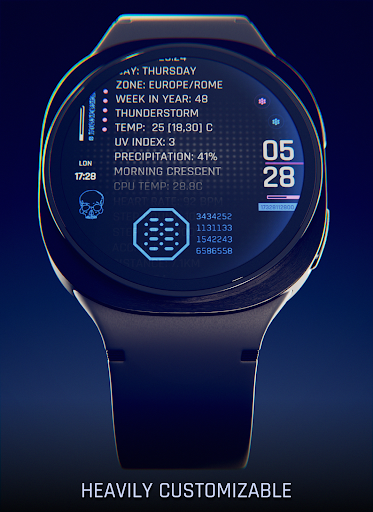
◉ Many different customizations
◉ Smart time positioning, still readable when 80% of the clock is under the sleeve!
◉ 12/24 hours format support
◉ Auto date format and units (km/mi, f/c)
◉ A lot of information at a glance: calories, distance, steps, heart rate, steps goal, notifications, date, weather, uv index, battery status and temperature..
◉ Customizable Overlay, backlight, logo and background
◉ Reacts to low battery, notifications and charging
◉ 4 customizable complications!
◉ Easy to use (and uninstallable) companion app
Installation
The installation is straightforward, don't worry!
Here's the procedure and a quick Q&A:
◉ Install this app in your smartphone
◉ Open it, and connect your Wear OS smartwatch to your device
◉ If the watch is connected, you will be able to tap the "view and install on smartwatch" button. (if not, refer to the Q&A below)
◉ Check your watch, you should see my watch face and the install button (if you see the price instead, refer to the Q&A below)
◉ Install it in your smartwatch
◉ Long press on your current watch face
◉ Swipe left until you see a "+" button, tap on it
◉ Look for the new watch face, tap on it
◉ Done. If you want, you can uninstall the companion app now!
Q&A
Q - I'm being charged twice! / The watch is asking me to pay again / you're a [derogatory adjective]
A - Keep calm. This happens when the account you’re using on the smartphone is different from the account used on the smartwatch. You have to use the same account (else, Google has no way to know that you already bought the watch face).
Q - I can't press the button in the companion app but my smartwatch is connected, why?
A - Most probably, you're using an incompatible device, like an old Samsung smartwatch or any other non-Wear OS smartwatch/smartband. You can easily check on Google if your device runs Wear OS before installling any watch face. If you're sure you have a Wear OS device and still you can't press the button, open the Play Store on your watch and search for my watch face manually!
Q - I have a Wear OS device, but it's not working! I'm gonna leave a one star review 😏
A - Stop right there! Most definitely there's an issue on your side while following the procedure, so please just send me an email (i usually reply during the weekends) and don't damage me with a bad and misleading review!
Q - The [name of a feature] is not working!
A - Try setting another watch face and then set mine again, or try allowing the permissions manually (on the watch obviously). If it still doesn't work, there's an handy "email button" in the companion app!
Support
If you need help or you have a suggestion, feel free to send me an email, I'll do my best to help.
I usually reply during the weekend because I'm just one person (not a company) and I have a job, so be patient!
This app is supported and updated to fix bugs and add new features. The overall design won't change, but it will surely be improved over time!
I know that the price isn't the lowest, but I worked a lot of hours on each watch face and the price also includes the support and the updates, if you think about it. And i assure you, I'll invest any earning on useful things and to help my family. Oh, and thanks for reading the full description! Nobody does it!
Thông tin ứng dụng
Quyền ứng dụng
-
Wearable sensors/Activity data
- body sensors (like heart rate monitors)
-
Other
- reorder running apps
- control vibration
- prevent device from sleeping
- set an alarm


Đánh giá và nhận xét
fake game
immediatly on using it its fantastic and theres a BUNCH of colors to choose from but seeing rebeccas colors was great homage i wish there were more logos tho or backgrounds like rebeccas, lucys, edgrunner logo, so on so forth maybe the ability to change the scroll speed?
I love how customisable it is. Love the scrolling display with so much information and the transition to AOD with the logo is very attractive. Only thing is I wish there was an option to animate the text in AOD but I guess it's limited to conserve battery. Either way I am very happy with the face and was looking for something cyberpunk theme while displaying a lot of information and now I have it. Makes my watch ultra look awesome. 🥰
nice face!!! love it
STR8 up badass
Awesome
Ứng dụng tương tự

Night Force Watch Face

TKS 02 Fracture Watch Face

SG-124

Digital Basic 7B Wear OS 4+

RHS 115 WR

JW115 jwstudio
Xem thêm từ nhà phát triển

Atomic Tic Watch Face

Loot Runner Watch Face

Covenant Plasma Watch Face

Madness Watch Face

Present Line Watch Face
