
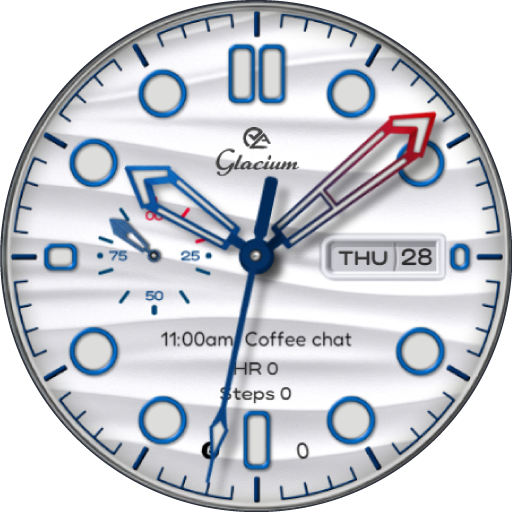
Glacium : Dive Watch Face
Personalization
0.0
122 Lượt tải
"A Bright, Diver-Inspired Watch Face Packed with Style & Customization."
Cài đặt trên Google Play
Ứng dụng trả phí


Về ứng dụng này
Experience the crisp elegance of Glacium, a bright and luminous diver-style watch face crafted for maximum clarity, premium style, and ultimate personalization. Glacium blends the aesthetics of luxury dive watches with the smart functionality of Wear OS.
FEATURE HIGHLIGHTS
⚡ Battery Status – Always-visible battery indicator to keep you powered.
📅 Day & Date Display – Classic, easy-to-read calendar format.
❤️ Heart Rate & Steps – Real-time fitness tracking in a clean, stylish layout.
🎨 Customizable Colors – Bright and refined themes to match your style.
⚙ 4x Custom Complication Slots – Place the info you use most at your fingertips.
🚀 4x Shortcuts – Quick access to your essential apps and tools.
🖤 AOD Styles – Elegant Always-On Display options.
Compatibility:
This watch face is designed for Wear OS devices running on Wear OS API 34+, including the Samsung Galaxy Watch 4, 5, 6, 7 and 8 as well as other supported Samsung Wear OS watches, Pixel Watches, and other Wear OS-compatible models from various brands.
How to Customize:
To customize your watch face, touch and hold the screen, then tap Customize (or the settings/edit icon specific to your watch brand). Swipe left and right to browse customization options and swipe up and down to select styles from the available custom options.
How to Set Custom Complications and Shortcuts:
To set custom complications and shortcuts, touch and hold the screen, then tap Customize (or the settings/edit icon specific to your watch brand). Swipe left until you reach "Complications," then tap on the highlighted area for the complication or shortcut you want to set up.
FEATURE HIGHLIGHTS
⚡ Battery Status – Always-visible battery indicator to keep you powered.
📅 Day & Date Display – Classic, easy-to-read calendar format.
❤️ Heart Rate & Steps – Real-time fitness tracking in a clean, stylish layout.
🎨 Customizable Colors – Bright and refined themes to match your style.
⚙ 4x Custom Complication Slots – Place the info you use most at your fingertips.
🚀 4x Shortcuts – Quick access to your essential apps and tools.
🖤 AOD Styles – Elegant Always-On Display options.
Compatibility:
This watch face is designed for Wear OS devices running on Wear OS API 34+, including the Samsung Galaxy Watch 4, 5, 6, 7 and 8 as well as other supported Samsung Wear OS watches, Pixel Watches, and other Wear OS-compatible models from various brands.
How to Customize:
To customize your watch face, touch and hold the screen, then tap Customize (or the settings/edit icon specific to your watch brand). Swipe left and right to browse customization options and swipe up and down to select styles from the available custom options.
How to Set Custom Complications and Shortcuts:
To set custom complications and shortcuts, touch and hold the screen, then tap Customize (or the settings/edit icon specific to your watch brand). Swipe left until you reach "Complications," then tap on the highlighted area for the complication or shortcut you want to set up.
Thông tin ứng dụng
Phiên bản
Cập nhật vào
Oct 05, 2026
Kích thước
Yêu cầu Android
ID gói
com.timecanvas.glacium
Lượt cài đặt
122
Danh mục
Personalization
Có gì mới
General performance and stability enhancements in companion app.
Quyền ứng dụng
-
Other
- full network access

Đánh giá và nhận xét
0.0
Tổng số đánh giá
5
4
3
2
1
E
Etienne Willemse
Mar 01, 2026
Just 1 amzing looking watch face all around. So professionally done by the best designer. thanks so much. love your work


