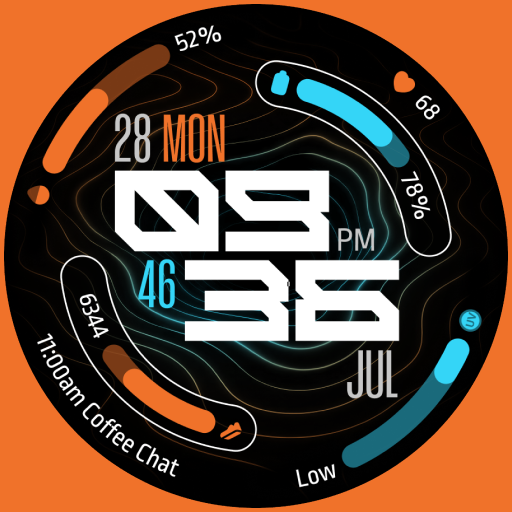
TKS 34 Jupiter Watch Face
Personalization
0.0
132 Lượt tải
"Jupiter: A Hybrid, full of information and highly customizable watch face"
Cài đặt trên Google Play
Ứng dụng trả phí


Về ứng dụng này
Jupiter: A highly Customizable Hybrid Wear OS Watch Face. Featuring 4 Customizable Complications, 2 App Shortcuts, and 30 Color Palettes..
Key Features:
- Hybrid Watch Face (Analog and Digital)
- 30 Color Palettes.
- 3 styles for clock hands.
- AOD Mode With 3 Styles: Informative, Hide Complications, and Minimal.
- 2 index styles.
- 12/24 Hour Time Format Support.
- 4 Customizable Complications: 3 Circular Complications and 1 Long-Text Complication for Calendar Events
- 2 App Shortcuts.
How to Install and Apply the Watch Face:
1. Ensure your smartwatch is selected during purchase.
2. Install the optional companion app on your phone (if desired).
3. Long press your watch display, swipe through available faces, tap "+", and select TKS 34 Jupiter Watch Face.
Note for Pixel Watch Users:
If steps or heart rate counters freeze after customization, switch to another watch face and back to reset the counters.
Ran into any issues or need a hand? We're happy to help! Just send us an email at [email protected]
Key Features:
- Hybrid Watch Face (Analog and Digital)
- 30 Color Palettes.
- 3 styles for clock hands.
- AOD Mode With 3 Styles: Informative, Hide Complications, and Minimal.
- 2 index styles.
- 12/24 Hour Time Format Support.
- 4 Customizable Complications: 3 Circular Complications and 1 Long-Text Complication for Calendar Events
- 2 App Shortcuts.
How to Install and Apply the Watch Face:
1. Ensure your smartwatch is selected during purchase.
2. Install the optional companion app on your phone (if desired).
3. Long press your watch display, swipe through available faces, tap "+", and select TKS 34 Jupiter Watch Face.
Note for Pixel Watch Users:
If steps or heart rate counters freeze after customization, switch to another watch face and back to reset the counters.
Ran into any issues or need a hand? We're happy to help! Just send us an email at [email protected]
Thông tin ứng dụng
Phiên bản
Cập nhật vào
Sep 06, 2026
Kích thước
Yêu cầu Android
ID gói
com.tks.jupiter
Lượt cài đặt
132
Danh mục
Personalization
Có gì mới
Target SDK Update