

UsA Shadow - USA119
Personalization





Về ứng dụng này
This watch face requires Wear OS API 33+ (Wear OS 4 or newer). Compatible with Galaxy Watch 4/5/6/7/8 Series and newer, Pixel Watch series and other watch face with Wear OS 4 or newer.
Make sure you are purchasing using the same Google account registered on your watch. The installation should begin automatically on the watch after a few moments.
After the installation is completed on your watch, do these steps to open the watch face on your watch :
1. Open the watch face list on your watch (tap and hold the current watch face)
2. Scroll to the right and tap "add watch face"
3. Scroll down and find new installed watch face in the "downloaded" section
Features:
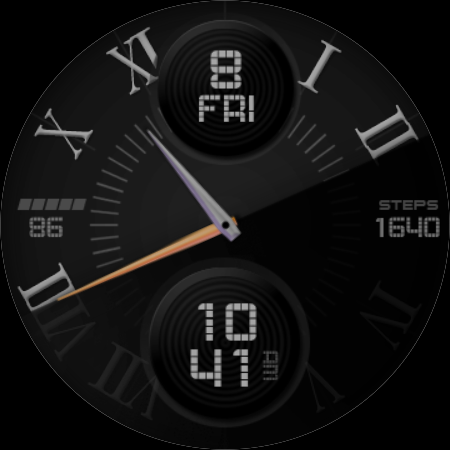
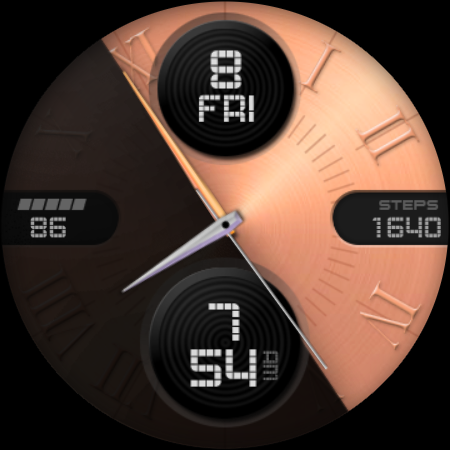
- Analog styles with dynamic shadow
- 12/24 hour mini digital hour
- 6 light background (set the dark background to the default first image before adjusting the light background)
- 5 dark background
- 5 index styles
- 4 hand styles
- customized shortcut complication
- special designed AOD mode
Tap and hold the watch face and go to the "customize" menu (or settings icon under the watch face) to change the styles and also manage the custom shortcut complication.
To change between 12 or 24-hour mode, go to your phone date and time settings and there is an option to use 24-hour mode or 12-hour mode. The watch will sync with your new settings after a few moments.
Special designed Always On Display ambient mode. Turn on the Always On Display mode on your watch settings to show a low power display on idle. Please be aware, this feature will use more batteries.
Join our Telegram group for live support and discussion
https://t.me/usadesignwatchface
Thông tin ứng dụng
Có gì mới
Đánh giá và nhận xét
App is stuck in the payment loop Asking again to pay on the watch when trying to install Support team recommended some workarounds none worked and now they are not responding, which is unproffessional Bad experience overall
Very attractive and close to perfection. I just wish there were more complication options. And I would like to be able to change the 6-o-clock complication especially because I already know the time from the hands. Weather would be ideal for me.
Maybe you should make it work correct before you sell it. If you've got to tell people to try again in a couple hours if it wants to charge you again it isn't ready to hit the market.
Beautiful watch face.
Great looking watch face, wish I could change the complications and my steps wound count. Just days zero even though I moved through out the day.
The "shadow" gives a nice minimal look. Would like the option to remove the steps but no big deal. Beautiful and modern face


