CELEST5588 Minimalist Watch
Personalization
0.0
689 Lượt tải
"Bold digital watch face with weather, fitness stats & 30 color variations."
Cài đặt trên Google Play
Ứng dụng trả phí




Về ứng dụng này
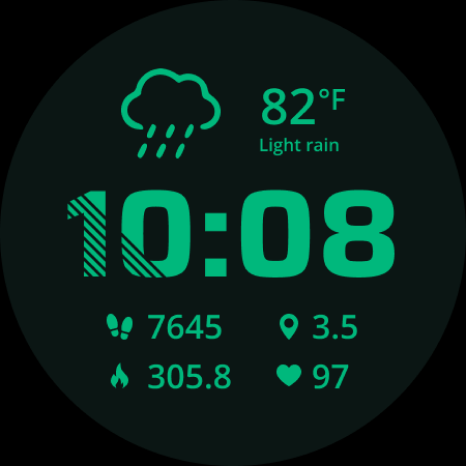
Digital and oversized: CELEST5588 Minimalist Watch fills the middle of the dial with the time, drops the leading digit into a hatched fill so the numerals read as a graphic as much as a clock, and keeps everything else to a single accent color. For Wear OS 5+ devices, including Galaxy Watch and Pixel Watch.
Above the time, a weather icon sits beside the temperature with the current conditions spelled out in words — light rain rather than a symbol you have to interpret. Below it, four stats fill a two-by-two grid: steps, distance, calories, and heart rate, each behind its own icon. Six invisible slots sit under the layout as app shortcuts, so you can tap through to what you use without adding a single visible element to the dial.
⚡ Features
- Oversized digital time with a hatched leading digit
- Weather icon, temperature, and conditions written out in words
- Steps, distance, calories, and heart rate in a two-by-two grid
- Six invisible complication slots for app shortcuts
- 12- or 24-hour time
- Kilometers or miles, following your Celsius or Fahrenheit setting
🎨 Customization
- 30 color variations: 15 dark tones and 15 soft pastels
- Optional gradient overlay for extra depth
- Always-on display dimming options to suit your battery
ⓘ About Calorie & Distance Stats
A note on stats: When shown directly on the watch face, calorie and distance values are estimated from your steps based on an average user, because Wear OS doesn't provide this data to watch faces from the watch's sensors. Complications are different — they receive real data from the system. Treat the built-in calorie and distance figures as a helpful approximation rather than an exact measurement.
✅ Compatible Devices
- Google Pixel Watch/2/3/4/5
- OnePlus Watch 2/2R/3/4
- Oppo Watch X2/X3
- Samsung Galaxy Watch 4/4 Classic/5/5 Pro/6/6 Classic/7/8/8 Classic/9/FE/Ultra (2024)/(2025)/Ultra 2
- Xiaomi Watch 2/2 Pro/5
🎁 BOGO Promotion: https://celest-watches.com/bogo/
✨ Explore the complete CELEST collection in one place — including all Wear OS, HUAWEI, and Apple Watch faces, along with our apps and tools — with the CELEST Catalog app: https://play.google.com/store/apps/details?id=com.celestwatches.catalog
🔧 Installation Help
Having trouble? We've got you covered:
- Use the dropdown menu next to "Install" on your phone to select your watch model or install directly from your watch's Play Store app.
- Updating weather data (if the watch face shows weather) may take time after installation but switching to another watch face and switching back or restarting both the watch and phone usually helps.
- Check out our installation and troubleshooting guide: https://celest-watches.com/installation-troubleshooting/
- Contact us at [email protected] for quick support
📞 Support & Community
📧 Support: [email protected]
📱 Follow @celestwatches on Instagram and subscribe to our newsletter to get notified of new releases and deals: https://celest-watches.com/newsletter/
Thông tin ứng dụng
Phiên bản
Cập nhật vào
Aug 05, 2026
Kích thước
Yêu cầu Android
Lượt cài đặt
689
Danh mục
Personalization
Có gì mới
Updated to target Android 16 (API 36).
Quyền ứng dụng
-
Other
- view network connections
- full network access

Đánh giá và nhận xét
0.0
Tổng số đánh giá
5
4
3
2
1
S
Steve Kouloumpiotis
Dec 25, 2025
Great work 💯
B
Brendon Hall
Sep 01, 2025
great simple data watch. nice symmetry and great color. very clean design