

CELEST5666 Retro Digital Watch
Personalization
0.0
59 Lượt tải
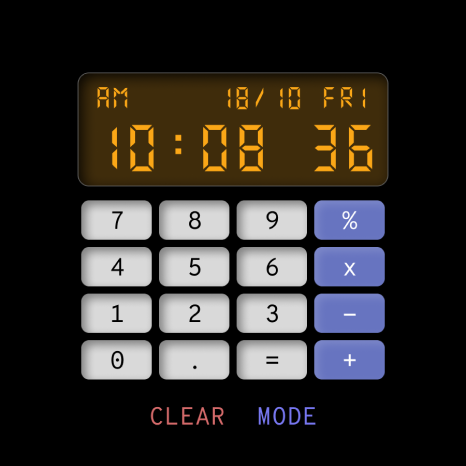
"Retro calculator watch face with working four-function math. 80s digital style."
Cài đặt trên Google Play
Ứng dụng trả phí




Về ứng dụng này
⚠️ This watch face requires the Calculator Complication app to work. Without it, the buttons won't respond and the calculator stays inert. Link to the app is below.
A working calculator on your wrist, styled after the digital calculator watches of the 80s. CELEST5666 Retro Digital Watch puts real four-function math behind every button — not decoration, not a static graphic, but actual computation driven by the Calculator Complication app. Tapping the date and weekday indicator opens the calendar — a small shortcut that keeps this calculator watch face useful even when you're not doing math.
Feature walkthrough: https://www.instagram.com/reel/DYJ078JtRqr/ (Different watch face, same feature set)
Link to the Calculator Complication app:
https://play.google.com/store/apps/details?id=com.celestwatches.calculatorcomplication
🎮 Features
- Working four-function calculator: add, subtract, multiply, divide
- 8-digit display with decimals, "E" on overflow or division by zero
- Doubles as a retro digital watch face when you're not calculating
- Tap the date or weekday indicator to open the calendar
- 12-hour or 24-hour time, follows your watch's setting
- The only complication slot on this watch face is reserved for the Calculator Complication
🎨 Customization
- 10 background colors x 5 screen colors x 8 display text colors — 400 combinations
🎯 Touch Accuracy
A note on tapping: watch screens are small, and the calculator buttons are smaller. Hitting them precisely takes a touch of practice.
Each button's tap region includes the digit or symbol drawn next to it — so the "5" button and the "5" glyph beside it are one combined target. The effective center sits slightly to the left of where it visually appears. A light tap aimed at the left-center of the button shape works well.
This is a watch and these are tiny buttons. Don't expect to fly through long calculations — but for the kind of math you'd do on a wrist (tip splits, quick conversions, age-of-someone-born-in-1987), it works.
✅ Compatible Devices
- Google Pixel Watch/2/3/4
- OnePlus Watch 2/2R/3/4
- Oppo Watch X/X2
- Samsung Galaxy Watch 4/4 Classic/5/5 Pro/6/6 Classic/7/8/8 Classic/FE/Ultra (2024/2025)
- Xiaomi Watch 2/2 Pro/5
🎁 BOGO Promotion: https://celest-watches.com/bogo/
✨ Explore the complete CELEST collection in one place — including all Wear OS, HUAWEI, and Apple Watch faces, along with our apps and tools — with the CELEST Catalog app: https://play.google.com/store/apps/details?id=com.celestwatches.catalog
🔧 Installation Help
Having trouble? We've got you covered:
- Use the dropdown menu next to "Install" on your phone to select your watch model or install directly from your watch's Play Store app.
- Updating weather data (if the watch face shows weather) may take time after installation but switching to another watch face and switching back or restarting both the watch and phone usually helps.
- Check out our installation and troubleshooting guide: https://celest-watches.com/installation-troubleshooting/
- Contact us at [email protected] for quick support
📞 Support & Community
📧 Support: [email protected]
📱 Follow @celestwatches on Instagram and subscribe to our newsletter to get notified of new releases and deals: https://celest-watches.com/newsletter/
Thông tin ứng dụng
Phiên bản
Cập nhật vào
Aug 05, 2026
Kích thước
Yêu cầu Android
Lượt cài đặt
59
Danh mục
Personalization
Có gì mới
Updated to target Android 16 (API 36).
Quyền ứng dụng
-
Other
- view network connections
- full network access
- Google Play license check

Đánh giá và nhận xét
0.0
Tổng số đánh giá
5
4
3
2
1
S
SuperMan Bat
Jul 14, 2026
cool


